
Technology
FIFA World Cup 2026: One eSIM for USA, Mexico and Canada


The dream is finally happening. Thousands of football enthusiasts are booking their flights to the USA, Mexico and Canada this World Cup 2026 season. The roar of packed stadiums in Guadalajara, the energetic atmosphere in Vancouver, the passionate crowds in Mexico City it’s the adventure of a lifetime. But here’s the reality: Football Fans travelling to North America for World Cup matches face a critical connectivity challenge that could make or break the experience.
From the moment you land at Mexico City International or Toronto’s Pearson Airport, your phone becomes your lifeline. You need it to navigate unfamiliar cities, stay in touch with your travel group, share the incredible moments happening in real-time, and handle last-minute plans. This is where choosing the right international eSIM transforms your entire World Cup journey from stressful to unforgettable.
The Football Fan’s Dilemma: Why You Can’t Rely on Your Home SIM providers
Picture this: You’re a young Liverpool supporter from Manchester who’s saved for years to attend World Cup matches in Mexico. You land in Monterrey. Your phone automatically connects to your UK carrier’s roaming service. Within 30 minutes of just scrolling social media, checking your WhatsApp group chat with your mates back home, and downloading the venue map, you’ve accumulated £45 in roaming charges. You’ve got two weeks left on your trip.
Or imagine you’re a passionate American soccer fan from Boston who’s finally making the journey to see the USMNT play in Canada. A single video call to your family costs $8. Checking real-time scores and team updates drains your data allowance faster than the final whistle. Your standard US carrier’s international roaming package suddenly feels less like a safety net and more like a financial trap.
This is the harsh reality facing British and US fans traveling to North America for World Cup matches. Standard international roaming, whether from UK carriers like Vodafone, EE, and O2, or American networks like Verizon, AT&T, and T-Mobile charges premium rates that can exceed $2-3 per SMS, $5+ per minute for calls, and $10-20 per GB of data.
For a two-week World Cup adventure visiting multiple Mexican and Canadian cities, roaming costs can easily exceed $300-500. That’s money that should be spent on match tickets, local experiences, and creating memories, not enriching your mobile carrier.
How British and US Fans Are Solving This: The North American eSIM Card Revolution
Get the N.American eSIM, the connectivity solution that’s transforming how football supporters experience travel for the World Cup 2026.
A regional eSIM with 20GB data works completely differently from the roaming your home carrier offers. Instead of connecting to expensive international roaming infrastructure, a North America eSIM is committed to giving you 20GB for £22.16 and connects to a top-tier network in the country. When you arrive in Mexico, you’re connected to local Mexican networks: Telcel, Movistar Mexico, AT&T Comercializacion Movil S. de R.L. de C.V. When you cross into Canada, you’re on Canadian networks TELUS Communications Inc., Videotron, Bell Mobility Inc, Rogers Communications Canada Inc and SaskTel. Finally, you are in the USA for the finals of the Football World Cup 2026 in New York – New Jersey Stadium, you are connected to local American networks T-Mobile United States, AT&T Mobility, Limitless Mobile LLC and Verizon, all within the same North American eSIM by WorldSIM. The number of networks available with this single eSIM in each country makes it the best coverage providing eSIM for the FIFA Football World Cup 2026 travel.
The results are game-changing:
For British Fans: A supporter from London saves £150-200 compared to paying Vodafone’s international roaming rates. They can maintain their UK number for important calls home while using a separate international travel eSIM for Mexican and Canadian connectivity. No more rationing WhatsApp messages or avoiding video calls.
For American Fans: A supporter from New York avoids Verizon’s notorious international rates ($2.50+ per minute). They stay connected to family and friends back home via their US number while using an international eSIM with international data for all activities in Mexico and Canada. The savings? Approximately 80-90% compared to standard roaming.
All the fans travelling to North America for World Cup matches get the same advantage: predictable, transparent costs with zero bill shock.
Why the Football 2026 World Cup eSIM is Perfect for Your FIFA Journey
When a fan is heading to the USA, Mexico, and Canada for the World Cup, an international eSIM card offers five critical advantages:
1. Seamless Coverage Across North American Countries: Unlike buying separate physical SIM cards at each border crossing, an international travel eSIM covers both countries simultaneously. No switching cards. No downtime. No panic at border checkpoints, wondering if you’ll stay connected.
2. Instant Activation Before You Even Leave Home Download your international eSIM profile before leaving the UK or US. Activate it the moment you land in Mexico City or Toronto. You’re connected within minutes, far faster than finding a local carrier store and explaining what you need in Spanish or navigating Canadian mobile shops.
3. Keep Your Home Number Active with the North American eSIM:, your family expects to reach you on your UK or US number. Your travel group uses your home number for coordination. With an international eSIM, both numbers work simultaneously. Receive calls and texts from home. Use your international data plan for everything else.
4. No Language Barriers or Complicated Contracts Fans often struggle with purchasing local SIM cards in foreign countries. Reading contracts in Spanish? Explaining your needs to someone who speaks limited English? An international eSIM card eliminates this friction completely. Download, activate, and done.
5. Transparent Pricing from Day One: Know exactly what you’ll pay before landing. No surprise bills. No “emergency roaming charges.” No hidden fees. British fans and American supporters can budget confidently.
The Worldsim Advantage of North American eSIM for World Cup 2026 Fans
For supporters heading to N.America, Worldsim has emerged as the trusted choice for international eSIM solutions. Here’s why:
Worldsim understands the specific needs of fans travelling to North America for World Cup matches. Their regional eSIM with 20GB isn’t designed for generic business travelers; it’s built for people like you: supporters who need reliable connectivity across multiple countries, want transparent pricing, and refuse to compromise on staying connected to the action.
Worldsim’s platform delivers instant activation, 24/7 English-language support (crucial for British and American travelers), and data plans specifically calibrated for match day activity.
eSIM Comparison 2026: FIFA World Cup Edition
WorldSIM · Airalo · Holafly · Nomad · Saily
North America Coverage: USA, Canada & Mexico | Data sourced from official provider pages, April 2026
Tired of paying for a day just to use your phone in a new country? We compared the top five eSIM providers side by side price, data, calls, network, and validity so you can choose the right plan before you fly. No roaming surprises. No airport SIM queues. Just honest numbers.
| Provider | Total Price | Data | Validity | Network (USA / CA / MX) | Voice Calls | SMS | Activation |
| WorldSIM | £22.16 | 20 GB (5G/4G) | 30 Days | AT&T / T‑Mobile (US), Rogers (CA), Telcel (MX) | 15 mins included | 50 SMS | Instant QR |
| WorldSIM | £38.40 | 50 GB (5G/4G) | 30 Days | AT&T / T‑Mobile (US), Rogers (CA), Telcel (MX) | 30 mins included | 50 SMS | Instant QR |
| WorldSIM | £ Coming soon | 100 GB (5G/4G) | 30 Days | AT&T / T‑Mobile (US), Rogers (CA), Telcel (MX) | 60 mins included | 50 SMS | Instant QR |
| Airalo | ~£32 / 20 GB | 20 GB (5G/4G) | 30 Days | T‑Mobile (US), Telus (CA), AT&T (MX) | Data only | Not included | Instant QR |
| Saily | ~£21 / 10 GB | 10 GB (4G/5G) | 30 Days | T‑Mobile (US), Rogers (CA), Movistar (MX) | Data only | Not included | Instant QR |
| Holafly | £47–£79 | Unlimited (FUP cap) | 7–30 Days | AT&T (US), Bell (CA), Telcel (MX) | Data only | Not included | Instant QR |
| Nomad | ~£30 / 20 GB | 20 GB (5G select) | 30 Days | T‑Mobile (US), Rogers (CA), AT&T (MX) | Data only | Not included | Instant QR |
Prices indicative as of May 2026. GBP converted at ~1.26. Network partners may vary by region confirm at provider websites before purchase. Holafly unlimited plans subject to fair-use throttling after daily threshold. WorldSIM’s 30-day validity covers the full tournament duration across all three host countries.
Key Takeaways
- WorldSIM is the only provider that includes voice calls (15 to 60 mins) and SMS, essential for match-day coordination in a packed stadium.
- Airalo and Nomad offer solid data-only options at competitive prices for fans attending a single leg of the trip.
- Saily is the budget pick but the 10 GB cap may run tight across three countries over several weeks.
- Holafly’s unlimited plan looks attractive but fair-use throttling can kick in during heavy stadium usage.
- Only WorldSIM’s 30-day validity covers the entire tournament window without a top-up
Real Fans’ Stories: How WorldSIM eSIM Changed Their Football Games Chasing Experience
The Manchester United Supporter’s Story: Gary, a lifelong Manchester United fan from Liverpool, spent two weeks previously traveling to Mexico City, Guadalajara, and Montreal on a business trip. With standard UK roaming, his projected costs were £280. With Worldsim’s international eSIM, he spent £22.16 total. That £257.84 saving? Gary posted: “The eSIM meant I never had to choose between staying connected and smoothly navigating and managing the trip.”
The Mexican Traveler Experience: Sarah from Seattle, who lives in Mexico, brought her teenage daughter to Canada to meet the family. Her family back home expected regular contact. Bell Mobility Inc. roaming would have cost $400+ for two weeks. Worldsim’s international travel eSIM costs $27.7. She kept her Mexican number active for emergency calls and used the North American eSIM for everything else. “My daughter could share real-time videos with her friends back home. Zero stress about the phone bill. Perfect.”
The American Football Club Group Adventure: A group of eight American football club players from America organized a Mexico-Canada trip. Coordinating across two countries, different time zones, and last-minute venue changes required constant communication. Traditional roaming would have cost each person $200-300. With Worldsim’s international eSIM, their communication costs dropped to £22.16 per person. The savings funded their celebratory dinner in Vancouver.
Preparing for Your FIFA World Cup 2026 Adventure: The North American eSIM Checklist
Before Departure (UK or US):
- ✓ Confirm your phone supports eSIM (iPhone XS+, most modern Android phones do)
- ✓ Download your Worldsim international eSIM profile before leaving home
- ✓ Keep your home SIM card active; don’t remove it
- ✓ Inform your bank/credit card company about international travel to avoid card blocks
Upon Arrival (Mexico or Canada):
- ✓ Activate your international eSIM card at the airport before leaving the terminal
- ✓ Test connectivity: immediately call or message someone
- ✓ Set your international eSIM as primary for data
- ✓ Save emergency numbers (911 in both countries)
- ✓ Enable WiFi calling as backup for your home number
During Your Stay:
- ✓ Monitor data usage through Worldsim’s mobile app
- ✓ Use WiFi at hotels/stadiums when available
- ✓ Share your international eSIM plan’s phone number with your travel group
- ✓ Keep digital copies of your plan details and support numbers
Why This World Cup Moment Demands the Right Connectivity
Fans traveling to North America for World Cup matches aren’t just tourists. You’re part of a global football community. You’re creating memories that last decades. You’re representing your countries and clubs. Every moment matters: the goal celebrations, the unexpected friendships with rival supporters, the late-night planning sessions with your travel group, the emotional victories.
A North American Regional eSIM ensures technology never interrupts those moments. While other fans are frantically searching for WiFi or fretting over roaming charges, you’re fully present, fully connected, completely engaged.
Make Your Football World Cup Adventure Unforgettable
Choosing Worldsim’s international eSIM with international data is choosing to prioritize your experience over logistics. It’s choosing to stay connected without stress. It’s choosing to share your World Cup journey with everyone who cares.
For British fans arriving from Manchester, London, Glasgow, and beyond for American supporters traveling from Boston, Los Angeles, Chicago, and everywhere between this is your moment. Mexico and Canada await. The stadiums are ready. Your international eSIM should be too.
Explore Worldsim’s North American data plans today. Your World Cup experience depends on it.


Cross-border money transfers used to be costly, with slow processing times, hidden exchange markups, and multiple intermediary fees. UR and other cross-border settlement schemes offer a modern solution, dramatically speeding up international transactions for companies and individuals alike. As commerce becomes increasingly globalised, legacy correspondent banking networks are a source of friction, delays and liquidity bottlenecks. Modern digital infrastructure eliminates these structural barriers to enable fast, secure and transparent cross-border movement of money.
International wires generally have to go through a number of correspondent banks and each adds time and cost to the transaction. Payment architectures designed for instant settlement do not leverage these multi-node networks but rather link senders and receivers through single clearing routes. This technological evolution allows international businesses to optimise cash flow, pay remote talent in a timely manner, and manage foreign vendor invoices without waiting days for verification.
The Underlying Reasons for Delay in Legacy Cross-Border Payments
Correspondent Banking Chains and Multiple Intermediaries
Under standard banking rules an international money transfer never goes straight from the originating bank to the destination account. Instead, the transaction passes through a number of intermediary banks, often across different timezones and business hours. Each node along the way checks the funds, processes the manual clearing logs, and assesses a processing fee. This greatly slows down execution.
Fragmented Foreign Exchange Arrangements and Manual Clearing
Legacy banks are limited by batch processing schedules for currency conversions which restrict market windows. If a transaction is received outside of local business hours or during a weekend, processing will resume the next business day. Furthermore, variations in clearing formats between countries require manual intervention if data fields do not match exactly with the formats of recipient accounts.
Features That Speed Up International Money Transfer
Direct Distributed Routing Infrastructure
Today’s cross-border engines leverage integrated network routing to establish direct connections to financial clearing networks around the world. Payment platforms, by eliminating unnecessary middleman nodes, process requests immediately when they are initiated. Real-time confirmation is provided to senders and recipients can get converted funds without any arbitrary holding periods.
Automated Continuously Liquidity Management
Advanced payment infrastructure is based on pre-funded global liquidity pools and automated algorithms for currency matching. Rather than waiting for the local central bank clearing windows to open, these platforms dynamically balance foreign exchange reserves. This continuous provision of liquidity makes it possible to convert FX at any moment of the day, even during weekends when the market is closed.
Automated Compliance Checking in Real Time
Routine international transactions are often flagged by manual anti-money laundering and know-your-customer checks in legacy systems, delaying payments for days. Next-generation platforms have automated compliance engines that can review data in milliseconds. Machine learning algorithms can screen sanctions lists, evaluate risk vectors and clear valid transactions instantly and without human delay.
Cross-Border Methods Compared: Legacy Networks vs. Next-Gen Platforms
The choice of the right transaction path directly impacts the speed of operations, cost predictability and cash flow visibility. Here’s a side-by-side comparison of traditional international wire transfers vs. next-generation settlement platforms:
- Settlement Time: Traditional wire transfers take 2-5 business days to clear, while next-gen settlement engines can complete cross-border transfers in seconds or minutes.
- Fee Structure: Legacy banking fees are unpredictable and include wide exchange rate markups, while modern routing models provide transparent, upfront transaction pricing.
- In terms of hours of operation, traditional systems only process transactions during local banking hours on weekdays, while advanced digital networks operate 24/7/365.
- Transaction Tracking: Traditional international wires offer little visibility into where funds are going, whereas next-gen protocols provide real-time end-to-end tracking updates.
- Data integration: Old school wire systems have limited payment messaging notes. Modern solutions support rich ISO 20022 metadata for automatic invoice reconciliation.
Advantages for Global Enterprises and Business Operation
Vendor and Supply Chain Settlement Made Simple
For global supply chains, predictable payment schedules are crucial to sustaining production momentum. Instant cross-border settlement allows purchasing departments to pay overseas suppliers immediately upon receipt of goods. This speed helps build vendor relationships, capture early payment discounts and mitigate foreign exchange volatility risks.
Zero-Resistance International Payroll Disbursement
With a distributed international workforce, that means sending dozens of localised payments across countries each pay period. Fast digital clearing frameworks allow HR and finance teams to process mass payouts at the same time. Instantly pay remote employees exact localised currency amounts, with no hidden recipient wire fees.
Practical Measures for the Optimisation of International Capital Transfers
Moving to Integrated API-Driven Financial Platforms
Businesses can get the maximum transfer speed by directly linking their internal enterprise resource planning systems with modern payment gateways via APIs. Automated API calls allow for immediate transfer once an invoice is approved, eliminating manual entry errors, and speeding up administrative workflows.
Setting Up a Multi-Currency Operational Account
Modern payment providers maintain localised receiving accounts to remove foreign exchange conversion steps altogether for common trade corridors. Organisations hold balances in destination currencies to make local cross-border payouts, avoiding international clearing channels where possible.
Strategic Significance of Frictionless Global Money Movement
The speed at which international payments are processed directly determines the ability of modern businesses to seize opportunities in the international market. Moving away from legacy correspondent networks to high speed clearing infrastructure cuts operational delays, cuts cross-border costs and maintains transaction margins. Accelerated payment protocols are a means by which businesses can secure a more agile and globally competitive financial footprint.


A single inflation number can move the pound, but professional currency analysis rarely stops at the headline rate. The composition of inflation can matter just as much as the total because different components tell different stories about domestic demand, wages, energy costs, and how persistent price pressure may be.
For sterling, those details matter because the Bank of England sets monetary policy with the goal of maintaining price stability. If inflation appears persistent, markets may expect tighter policy for longer. If price pressure is falling for reasons that look durable, expectations can move the other way. Currency markets respond to those changing expectations, not merely to whether inflation is high or low.
Headline inflation can hide very different forces
Headline consumer inflation combines many categories. Energy, food, goods, rents, hospitality, transportation, and other services can move for different reasons. A decline caused by lower energy prices may have different implications from a decline caused by weaker domestic wage pressure.
That distinction is important because central banks have limited influence over some global commodity shocks. They have more reason to focus on signs that inflation is becoming embedded in domestic wages and service prices.
Services inflation can signal persistence
Services tend to be labor-intensive. Restaurants, hotels, professional services, transportation, and other service businesses often have wage costs that adjust more slowly than commodity prices.
If services inflation remains firm while goods inflation falls, policymakers may worry that underlying domestic inflation is still persistent. Markets can then reassess how quickly interest rates might be reduced, which can affect UK bond yields and sterling.
Wage growth connects inflation to the labor market
Pay growth matters because wages are both household income and a major business cost. Strong nominal wage growth can support consumer spending, but if productivity does not keep pace, it can also make it harder for businesses to absorb labor costs without raising prices.
Currency traders therefore monitor wage data alongside employment, vacancies, inactivity, and surveys of hiring conditions. A cooling labor market can reduce wage pressure over time, while persistent wage growth may keep the inflation debate alive even after the headline rate improves.
Markets trade the surprise relative to expectations
The same inflation reading can produce different currency reactions depending on what investors expected. If the market has already priced in a strong number, an outcome that merely matches expectations may create little movement. A small miss in a closely watched services measure can sometimes matter more than a larger move in a volatile component.
That is why anyone building a GBP to USD forecast should distinguish between the economic trend and the market’s prior assumptions. Forecasting the data is only one part of the problem. The second is estimating what has already been priced into interest-rate expectations and sterling.
One month does not establish a trend
Inflation data can be noisy. Seasonal effects, airfares, energy prices, tax changes, and base effects can create large monthly movements. Analysts therefore look for confirmation across several releases rather than treating one print as definitive.
The same applies to wage data, which can be revised and affected by changes in workforce composition. A robust currency view should be able to survive small revisions rather than depending on a single exact number.
Inflation expectations can affect real returns
Currency markets also care about the difference between nominal interest rates and expected inflation. A high policy rate does not necessarily provide an attractive real return if investors expect inflation to remain equally high. When inflation expectations fall faster than nominal yields, real yields can rise, potentially changing the relative appeal of sterling assets.
This relationship is not mechanical because exchange rates respond to global conditions as well as domestic policy. Still, comparing nominal yields with inflation expectations can help explain why the pound sometimes reacts differently than a simple ‘higher inflation means higher rates’ story would imply.
The Bank of England reaction function is not mechanical
Even when inflation is above target, policymakers consider the broader outlook. Growth, labor-market slack, inflation expectations, credit conditions, and evidence of persistence all influence decisions.
Markets try to infer this reaction function from speeches, meeting minutes, forecasts, and voting patterns. Two inflation reports with similar headline numbers can have different consequences if the policy backdrop has changed.
How to build a better inflation dashboard
A practical sterling dashboard can separate headline inflation from core inflation, services inflation, wage growth, and measures of labor-market tightness. It can then add market-based information such as UK government bond yields and expected policy rates.
The goal is not to create more indicators for their own sake. It is to answer a sequence of questions: Is inflation falling? Which components are driving the move? Are domestic pressures easing? Is the labor market cooling? And has the market already adjusted its interest-rate expectations?
Conclusion
For sterling, inflation is not one number. The mix of goods, energy, services, wages, and domestic demand helps determine whether price pressure looks temporary or persistent.
A stronger GBP/USD framework therefore looks beneath the headline release and connects inflation composition to monetary-policy expectations. That approach cannot eliminate forecast uncertainty, but it gives investors a more realistic understanding of why similar inflation numbers can produce very different reactions in the pound.

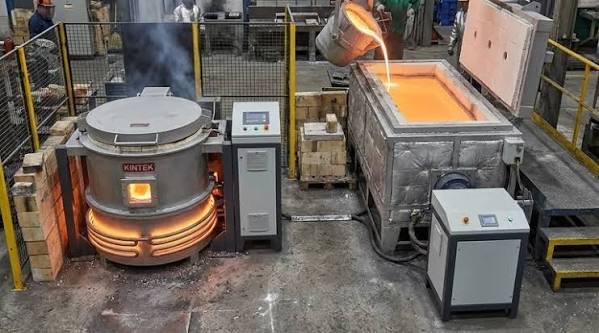
The phrase aluminum shell furnace sounds as though it describes what goes into the vessel. It describes part of the vessel instead. That naming trap can send a buyer comparing the wrong equipment, especially when an enquiry for a coreless induction furnace mixes questions about structural support, metal suitability and changing alloys. Separate those questions before reading the capacity column.
A DHG steel shell or DHL aluminum shell designation belongs in the equipment description. Melt duty belongs in the application description. Buyers need both, because a familiar construction material does not establish which metals a particular furnace can process or what must change when the production programme changes. The useful comparison starts inside the furnace and works outward.
Look inside the crucible before reading the shell label
The US Department of Energy describes the coreless arrangement as a refractory crucible enclosed by a water-cooled coil carrying alternating current. Electrical current induced in conductive material produces heat through resistance. The exterior shell is therefore only part of the assembly: identifying its material does not describe the refractory, the electromagnetic coupling or the cooling provision required for the proposed melting task.
Read the drawing inward. Ask where the charge sits, what contains the melt and which components require cooling. Those questions help separate construction terminology from process requirements without assuming that every item in a general technical diagram belongs to the offered equipment. The quotation must identify the actual arrangement. A label on its cover cannot substitute for that description.
For a coreless induction furnace enquiry, request a clear distinction between a general illustration and the proposed assembly drawing. Mark any components that are optional or supplied elsewhere, and ask how their absence affects the application response. Keep those qualifications attached to the offer. Otherwise a buyer can interpret the apparent completeness of a diagram as evidence that the quotation includes every item needed for the duty, although the commercial scope has never said so.
Compare product families without assigning them a metal
Dinghong lists the DHG steel shell family at nominal capacities of 0.5–20 tons and the DHL aluminum shell family at 0.1–8 tons. These are catalogue ranges for furnace families. They do not assign steel exclusively to the former or aluminum exclusively to the latter, and they do not establish a common melting cycle for every model within either range.
Write the intended metal beside the model being proposed. Then require the supplier to confirm that combination, including the relevant lining, electrical and cooling conditions, rather than letting the shell name act as a proxy for application approval. This is where metal suitability becomes a checkable statement. Without an identified duty, offers can look comparable while answering different questions about the material and the required state of the melt.
Ask what the structural claim actually covers
Shell rigidity is a reasonable subject for an engineering discussion, but a material name is not a structural assessment. Ask for the manufacturer’s description of the assembled furnace support, the loads it is intended to carry and the inspection requirements that apply to the proposed installation. Keep the question attached to the actual design. It cannot be answered by ranking material names in isolation.
For a DHG steel shell proposal, request evidence specific to that assembly; use the same approach when reviewing a differently constructed vessel. If an offer says the body is more rigid, ask what comparison supports the statement and which operating condition it addresses. No universal advantage follows from the catalogue label alone. This article provides no measured deflection, fatigue life or structural certification for either family, and none should be inferred from their listed capacities.
Changing alloys is a process decision
A plant considering a new metal needs more than a statement that induction can heat conductive materials. The proposed change raises questions about the existing refractory, the required melt condition, residual material and the acceptance checks for the new production route. Name the intended transition explicitly. An enquiry describing only a more flexible furnace leaves the supplier to guess which changes the buyer expects to make.
Prepare an alloy-change enquiry before assuming that the current coreless induction furnace can continue unchanged: identify the present duty, identify the proposed duty, and ask the responsible specialists to state what must be reviewed before the new material is introduced. This is an engineering review request, not an operating procedure. Decisions about lining changes, preparation and handling belong to the equipment and process instructions approved for that installation.
Retain the unanswered questions. They define the remaining work.
Insulation details have a narrower meaning than service life
Dinghong’s melting-furnace page describes coil insulation using 7–11 layers. That is a disclosed construction detail, not a demonstrated service-life figure for a particular customer’s furnace. Turning a layer count into a lifetime promise would require evidence that the product description does not provide, including a defined operating duty and a clear account of what event marks the end of service.
Use the detail to ask a better question. Request the applicable inspection and maintenance instructions, with responsibility for checking the coil and its surrounding components identified in the handover. A DHL aluminum shell model still needs its own approved maintenance basis; a general description elsewhere in the range does not establish every detail of the chosen unit. Construction information is useful when its scope remains visible.
Cooling connections follow the equipment boundary
A closed cooling tower keeps process fluid inside a heat-exchange coil while spray water and air remove heat externally. That distinction matters for a furnace installation because the process circuit and the spray circuit serve different functions. Dinghong’s separate cooling product description establishes that equipment arrangement; it does not select a tower or specify the furnace-side circulation required for an individual melting duty.
Assign the interface. The engineer responsible for the proposed furnace must have the cooling requirements needed to check the selected tower and connecting circuit, while the installation team needs an agreed way to verify those requirements during commissioning. The Dinghong induction furnace equipment range helps identify the product families involved. Suitability still needs confirmation at their connection points, especially when a revised melt duty changes the original application brief.
Limits of category-level comparisons
Comparing a steel shell family with an aluminum shell family is useful for narrowing an enquiry. It stops being useful when the comparison silently becomes a prediction of metal quality, furnace life or output under an unspecified operating programme. Each prediction asks for different evidence. Keep the categories broad and the application statement precise.
Where it stops: neither the general coreless arrangement nor a published capacity range authorizes switching metals, changing a lining or modifying cooling provision. The article explains what to ask, not how to carry out those actions. Before accepting a broad claim of flexibility, require the offered model and proposed metal to appear together in a written application response that names the conditions and exclusions, so the plant can see what has actually been assessed.
Unknown conditions deserve an open entry in the enquiry, rather than an optimistic interpretation.
Turn the enquiry into a model-specific comparison
Use a furnace application comparison that keeps construction and process fields separate. The document does not need an elaborate scoring system. Its purpose is to reveal whether competing offers address the same job and whether an attractive statement has evidence behind it, before price or delivery time dominates the discussion.
- Name the proposed model and its shell construction.
- Specify the metal and the intended batch duty.
- Ask which refractory and cooling requirements apply.
- Request the basis for any structural or service-life claim.
- List proposed alloy changes for explicit engineering review.
- Record the acceptance evidence and unresolved exclusions.
Compare answers, not implied meanings. If a supplier confirms the model but leaves the new metal unanswered, the application is still unresolved. That is a more useful result than treating a construction label as permission to melt whatever the next production order requires.

Buying Bedroom Furniture Built To Last

Retrofitting British Manufacturing: Scaling Productivity via Solid-State Switching and Contactless Sensing

Lifeguard Certification Explained: What You Learn and Why It Matters

Who Is Shameera? All You Need To Know About Charli XCX’s Mother

Who Is Gulliver Flynn Oldman? The Untold Story of Sir Gary Oldman’s Son

Meet Rosemary Turner: The Mother of Actor Callum Turner
-
Biographies8 months ago
Who Is Shameera? All You Need To Know About Charli XCX’s Mother
-
Biographies8 months ago
Who Is Gulliver Flynn Oldman? The Untold Story of Sir Gary Oldman’s Son
-
Biographies9 months ago
Meet Rosemary Turner: The Mother of Actor Callum Turner
-

 Biographies7 months ago
Who is Alexandra James? Inside The Life of Jeremy Clarkson’s Former Partner
-
 Biographies8 months ago
Who is Todd McRae? Meet Tate McRae’s Father
-
 Biographies8 months ago
Who Is Daniel Mara? The Untold Story of Kate Mara’s Private Sibling
-
 Celebrity9 months ago
Who Is Peter Hernandez? The Real Story of Bruno Mars’ Father
-
 Biographies8 months ago
Who Was Adrian Mayers? The Untold Life of A$AP Rocky’s Late Father