
Technology
How I Fixed a “No Internet Connection” Error Caused by Outdated Drivers


A stable internet connection is something I usually take for granted — until it suddenly stops working. A few weeks ago, my PC experienced a network connection disaster that left me completely disconnected from the internet. I tried everything to solve the issue, but nothing worked. That’s when I discovered Driver Booster 13. In this article, I’ll share my complete experience with Driver Booster 13 and show you how it helped me restore my network connection to normal without spending hours.
Part 1: The Unexpected Network Disaster
It all started on an ordinary day when I turned on my PC, expecting everything to work normally. However, a “No Internet Connection” appeared on my PC screen, leaving me in shock. I went through all the basic troubleshooting steps I knew. I restarted the router, checked the cables, disabled and re-enabled the network adapter, and even ran the built-in Windows network troubleshooter. Unfortunately, none of these methods worked. That’s when I realized that the issue is with the network drivers. I noticed that the network adapter didn’t seem to be functioning properly, which made me suspect that the drivers were either outdated or corrupted.
Part 2: Introducing Driver Booster 13

Once I confirmed that the issue is within the network drivers, I started looking for a reliable driver updater that could automatically detect and fix driver-related problems without requiring advanced technical knowledge. That’s when I found Driver Booster 13. Driver Booster 13 is an all-in-one driver management tool designed to automatically scan, update, and repair outdated or missing drivers on a Windows PC. It has an extensive database and can solve most of your system driver issues with a single click — no professional help required.
What really caught my attention was how quickly it works compared to manual methods. Instead of spending hours searching for the correct driver version, the software immediately scans the system and highlights exactly what needs to be updated or repaired.
Part 3: How Driver Booster 13 Identified the Problem
After installing Driver Booster 13 on my PC, I was impressed with the simple and intuitive interface of the program. Everything was clearly laid out, and I didn’t need any technical knowledge to understand where to start. Here is how I used this program to identify the problem and fix it:
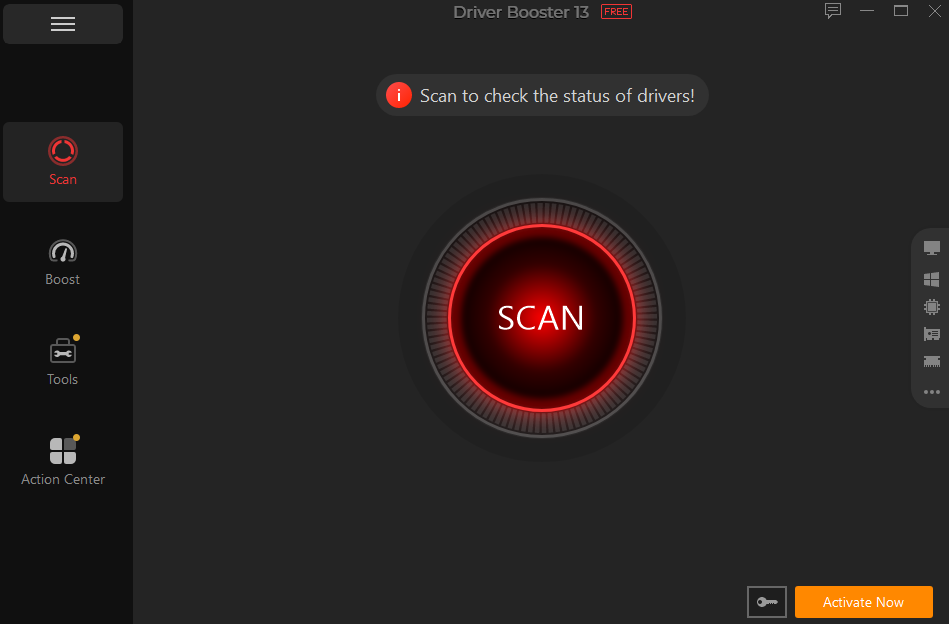
- First, I download and install the latest version of Driver Booster. Launch it and click on the “Scan” button. The program will automatically begin the scan for outdated drivers on the PC.
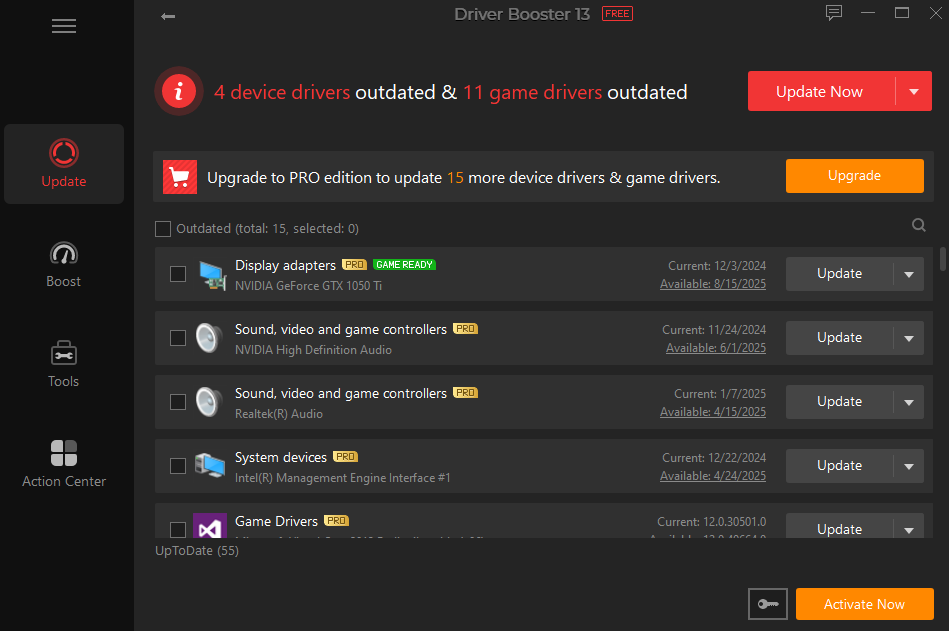
- Once the scan is complete, a list of all the outdated or corrupt drivers available on your PC will appear on your screen, including network adapters. Click on the “Update All” button to begin the updating process.
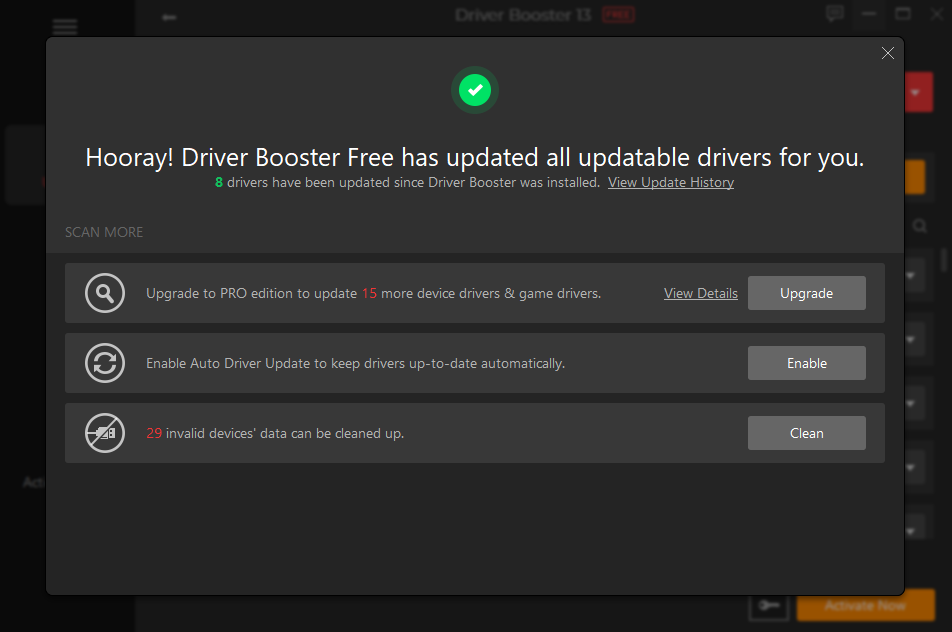
- Within seconds, Driver Booster 13 will update all the outdated drivers. Once the update process is finished, restart your device and check whether the network issue has been resolved.
Part 4: Additional Features That Impressed Me
Beyond just fixing my network issue, Driver Booster 13 offers several additional features that impressed me during my experience. Here are some of the best features of Driver Booster 13 in 2026:
- One-Click Updates: One of the best things I found about Driver Booster 13 is that it allows anyone to update all outdated drivers with a single click — no manual effort required.
- Huge Driver Library: Driver Booster 13 supports 18 million drivers, including sound, graphics card, printer, USB, network adapters, display adapters, motherboard, Bluetooth, and more.
- 1200+ Major Brands: The program supports drivers from over 1200 major brands, such as INTEL, AMD, NVIDIA, Canon, Brother, RealTek, TP-Link, Samsung, Song, LG, MSI, Dell, and Lenovo.
- Dual Certification: The thing I liked the most about Driver Booster 13 was its dual certification system, which added an extra layer of trust and security. All drivers available in this program are certified with WHQL and iObit Test.
- User-Friendly Interface: Driver Booster 13 offers a simple and intuitive interface, allowing users to update all PC drivers with a single click — without any professional help.
Part 5: FAQs Related to Driver Booster 13
- Is Driver Booster 13 Free to Use?
Yes, Driver Booster 13 is free to use. However, I found that the free version of this program offers fewer features than the paid version.
- Can Driver Booster Improve Gaming Performance?
The program includes a Game Boost feature that lets me optimize my system for gaming with just one click.
Final Thoughts
When the network connection disaster hit me, I was completely shocked and had no idea how to fix it. At first, I thought it would be a simple issue that would go away after restarting my PC or router, but it didn’t. That’s when Driver Booster 13 changed everything for me. It helped me identify the real issue and gave me a straightforward way to fix it without any technical complications.


A short video does not have much time to establish a world. Before the audience understands the story, the opening has already told them where to look and what sort of experience to expect. A good opening therefore needs a clear visual idea, whether the clip is playful, atmospheric, or built around a small surprise.
That idea does not have to be loud. A still room with one moving object can be more intriguing than a crowded sequence of effects. The important relationship is between what viewers see first and what they discover next. Thinking about that relationship gives creators a more useful starting point than chasing a particular visual trend.
Text-to-video and image-to-video tools such as seedance 3.0 make it possible to explore those openings with a written scene or a reference picture. The creative task remains choosing what the shot should reveal. Three approaches are especially useful for short fictional scenes: a reveal, an action already underway, and a change in an ordinary detail.
Opening one: reveal the world gradually
A reveal begins with less information than the audience eventually receives. The camera might start close to a glowing object before showing the room around it. Or it might begin behind a curtain and move far enough to expose a tiny stage. The pleasure comes from discovering the context.
Consider a hypothetical scene that opens on a paper boat. At first, the frame contains only folded paper and reflected light. A wider view reveals that the boat is travelling through a miniature city made from cardboard. The subject has not changed, but its meaning has. The second view rewards attention to the first.
This structure suits an imaginative channel introduction or a compact story teaser. It gives the viewer a reason to remain through the camera move. The reveal should be easy to understand, however. If the new information is too small or the frame is too busy, the audience may miss the moment entirely.
When developing the scene, decide which detail is withheld and which remains visible. A reveal with no clear subject becomes a guessing game. A reveal that explains everything immediately has no discovery left. The balance comes from letting the first image be interesting on its own while reserving something for the next moment.
Opening two: enter halfway through an action
Another approach starts with movement already in progress. A drawn character is carrying a comically large parcel. A robot is trying to balance on a narrow plank. A cat is approaching an unfamiliar object. Viewers arrive with a simple question: what happens next?
The action should be legible without a lengthy setup. One subject, one goal, and one obstacle are often enough for a brief scene. This is why a modest physical action can work better than an elaborate backstory. The audience can understand a parcel slipping, even when they know nothing about the character holding it.
Image references can help establish the character’s intended appearance before movement is introduced. A creator can then describe the action in plain terms and use the result to judge timing. The useful comparison is between specific performances of the same idea, rather than unrelated scenes with different characters and settings.
Keep the payoff proportional to the setup. A light comic opening might end with the character finding a clever solution. A dramatic opening might stop just before the outcome. In either case, the opening establishes a promise that the rest of the clip should acknowledge.
Opening three: make one ordinary detail unexpected
The third approach starts with a familiar scene and introduces one unusual change. A shadow moves in a different direction. A painted flower gently unfolds. A small desk ornament turns towards the camera. The ordinary setting makes the unusual detail easier to notice.
This can be an effective way to develop a restrained visual identity. Instead of filling every frame with spectacle, the creator repeats a recognisable kind of surprise. The setting may vary between posts, while the relationship between stillness and motion remains consistent.
A short experiment in Seedance could begin with an original illustration and a single intended movement. The reference image supplies the world; the animation supplies the change. Keeping the surrounding scene simple makes it easier to decide whether the movement adds something to the original idea.
The opening needs somewhere to go
Whichever approach you choose, consider the final frame as well as the first. A reveal may settle on the complete miniature world. An action scene may end on a reaction. An unexpected detail may return to stillness. A deliberate ending makes a short clip feel like a complete thought rather than a fragment cut off at random.
Sound can support that structure when the selected generation mode provides it, or it can be added during editing. A soft environmental sound may build atmosphere; a pause can emphasise a reveal. The image should still communicate its central idea to someone watching without audio.
Before sharing, view the clip at the size of an ordinary phone screen. Check that the important detail is visible and that captions do not cover it. The goal is not to pack a full film into a few seconds. It is to give one visual idea enough space to land.


Cross-border money transfers used to be costly, with slow processing times, hidden exchange markups, and multiple intermediary fees. UR and other cross-border settlement schemes offer a modern solution, dramatically speeding up international transactions for companies and individuals alike. As commerce becomes increasingly globalised, legacy correspondent banking networks are a source of friction, delays and liquidity bottlenecks. Modern digital infrastructure eliminates these structural barriers to enable fast, secure and transparent cross-border movement of money.
International wires generally have to go through a number of correspondent banks and each adds time and cost to the transaction. Payment architectures designed for instant settlement do not leverage these multi-node networks but rather link senders and receivers through single clearing routes. This technological evolution allows international businesses to optimise cash flow, pay remote talent in a timely manner, and manage foreign vendor invoices without waiting days for verification.
The Underlying Reasons for Delay in Legacy Cross-Border Payments
Correspondent Banking Chains and Multiple Intermediaries
Under standard banking rules an international money transfer never goes straight from the originating bank to the destination account. Instead, the transaction passes through a number of intermediary banks, often across different timezones and business hours. Each node along the way checks the funds, processes the manual clearing logs, and assesses a processing fee. This greatly slows down execution.
Fragmented Foreign Exchange Arrangements and Manual Clearing
Legacy banks are limited by batch processing schedules for currency conversions which restrict market windows. If a transaction is received outside of local business hours or during a weekend, processing will resume the next business day. Furthermore, variations in clearing formats between countries require manual intervention if data fields do not match exactly with the formats of recipient accounts.
Features That Speed Up International Money Transfer
Direct Distributed Routing Infrastructure
Today’s cross-border engines leverage integrated network routing to establish direct connections to financial clearing networks around the world. Payment platforms, by eliminating unnecessary middleman nodes, process requests immediately when they are initiated. Real-time confirmation is provided to senders and recipients can get converted funds without any arbitrary holding periods.
Automated Continuously Liquidity Management
Advanced payment infrastructure is based on pre-funded global liquidity pools and automated algorithms for currency matching. Rather than waiting for the local central bank clearing windows to open, these platforms dynamically balance foreign exchange reserves. This continuous provision of liquidity makes it possible to convert FX at any moment of the day, even during weekends when the market is closed.
Automated Compliance Checking in Real Time
Routine international transactions are often flagged by manual anti-money laundering and know-your-customer checks in legacy systems, delaying payments for days. Next-generation platforms have automated compliance engines that can review data in milliseconds. Machine learning algorithms can screen sanctions lists, evaluate risk vectors and clear valid transactions instantly and without human delay.
Cross-Border Methods Compared: Legacy Networks vs. Next-Gen Platforms
The choice of the right transaction path directly impacts the speed of operations, cost predictability and cash flow visibility. Here’s a side-by-side comparison of traditional international wire transfers vs. next-generation settlement platforms:
- Settlement Time: Traditional wire transfers take 2-5 business days to clear, while next-gen settlement engines can complete cross-border transfers in seconds or minutes.
- Fee Structure: Legacy banking fees are unpredictable and include wide exchange rate markups, while modern routing models provide transparent, upfront transaction pricing.
- In terms of hours of operation, traditional systems only process transactions during local banking hours on weekdays, while advanced digital networks operate 24/7/365.
- Transaction Tracking: Traditional international wires offer little visibility into where funds are going, whereas next-gen protocols provide real-time end-to-end tracking updates.
- Data integration: Old school wire systems have limited payment messaging notes. Modern solutions support rich ISO 20022 metadata for automatic invoice reconciliation.
Advantages for Global Enterprises and Business Operation
Vendor and Supply Chain Settlement Made Simple
For global supply chains, predictable payment schedules are crucial to sustaining production momentum. Instant cross-border settlement allows purchasing departments to pay overseas suppliers immediately upon receipt of goods. This speed helps build vendor relationships, capture early payment discounts and mitigate foreign exchange volatility risks.
Zero-Resistance International Payroll Disbursement
With a distributed international workforce, that means sending dozens of localised payments across countries each pay period. Fast digital clearing frameworks allow HR and finance teams to process mass payouts at the same time. Instantly pay remote employees exact localised currency amounts, with no hidden recipient wire fees.
Practical Measures for the Optimisation of International Capital Transfers
Moving to Integrated API-Driven Financial Platforms
Businesses can get the maximum transfer speed by directly linking their internal enterprise resource planning systems with modern payment gateways via APIs. Automated API calls allow for immediate transfer once an invoice is approved, eliminating manual entry errors, and speeding up administrative workflows.
Setting Up a Multi-Currency Operational Account
Modern payment providers maintain localised receiving accounts to remove foreign exchange conversion steps altogether for common trade corridors. Organisations hold balances in destination currencies to make local cross-border payouts, avoiding international clearing channels where possible.
Strategic Significance of Frictionless Global Money Movement
The speed at which international payments are processed directly determines the ability of modern businesses to seize opportunities in the international market. Moving away from legacy correspondent networks to high speed clearing infrastructure cuts operational delays, cuts cross-border costs and maintains transaction margins. Accelerated payment protocols are a means by which businesses can secure a more agile and globally competitive financial footprint.


A single inflation number can move the pound, but professional currency analysis rarely stops at the headline rate. The composition of inflation can matter just as much as the total because different components tell different stories about domestic demand, wages, energy costs, and how persistent price pressure may be.
For sterling, those details matter because the Bank of England sets monetary policy with the goal of maintaining price stability. If inflation appears persistent, markets may expect tighter policy for longer. If price pressure is falling for reasons that look durable, expectations can move the other way. Currency markets respond to those changing expectations, not merely to whether inflation is high or low.
Headline inflation can hide very different forces
Headline consumer inflation combines many categories. Energy, food, goods, rents, hospitality, transportation, and other services can move for different reasons. A decline caused by lower energy prices may have different implications from a decline caused by weaker domestic wage pressure.
That distinction is important because central banks have limited influence over some global commodity shocks. They have more reason to focus on signs that inflation is becoming embedded in domestic wages and service prices.
Services inflation can signal persistence
Services tend to be labor-intensive. Restaurants, hotels, professional services, transportation, and other service businesses often have wage costs that adjust more slowly than commodity prices.
If services inflation remains firm while goods inflation falls, policymakers may worry that underlying domestic inflation is still persistent. Markets can then reassess how quickly interest rates might be reduced, which can affect UK bond yields and sterling.
Wage growth connects inflation to the labor market
Pay growth matters because wages are both household income and a major business cost. Strong nominal wage growth can support consumer spending, but if productivity does not keep pace, it can also make it harder for businesses to absorb labor costs without raising prices.
Currency traders therefore monitor wage data alongside employment, vacancies, inactivity, and surveys of hiring conditions. A cooling labor market can reduce wage pressure over time, while persistent wage growth may keep the inflation debate alive even after the headline rate improves.
Markets trade the surprise relative to expectations
The same inflation reading can produce different currency reactions depending on what investors expected. If the market has already priced in a strong number, an outcome that merely matches expectations may create little movement. A small miss in a closely watched services measure can sometimes matter more than a larger move in a volatile component.
That is why anyone building a GBP to USD forecast should distinguish between the economic trend and the market’s prior assumptions. Forecasting the data is only one part of the problem. The second is estimating what has already been priced into interest-rate expectations and sterling.
One month does not establish a trend
Inflation data can be noisy. Seasonal effects, airfares, energy prices, tax changes, and base effects can create large monthly movements. Analysts therefore look for confirmation across several releases rather than treating one print as definitive.
The same applies to wage data, which can be revised and affected by changes in workforce composition. A robust currency view should be able to survive small revisions rather than depending on a single exact number.
Inflation expectations can affect real returns
Currency markets also care about the difference between nominal interest rates and expected inflation. A high policy rate does not necessarily provide an attractive real return if investors expect inflation to remain equally high. When inflation expectations fall faster than nominal yields, real yields can rise, potentially changing the relative appeal of sterling assets.
This relationship is not mechanical because exchange rates respond to global conditions as well as domestic policy. Still, comparing nominal yields with inflation expectations can help explain why the pound sometimes reacts differently than a simple ‘higher inflation means higher rates’ story would imply.
The Bank of England reaction function is not mechanical
Even when inflation is above target, policymakers consider the broader outlook. Growth, labor-market slack, inflation expectations, credit conditions, and evidence of persistence all influence decisions.
Markets try to infer this reaction function from speeches, meeting minutes, forecasts, and voting patterns. Two inflation reports with similar headline numbers can have different consequences if the policy backdrop has changed.
How to build a better inflation dashboard
A practical sterling dashboard can separate headline inflation from core inflation, services inflation, wage growth, and measures of labor-market tightness. It can then add market-based information such as UK government bond yields and expected policy rates.
The goal is not to create more indicators for their own sake. It is to answer a sequence of questions: Is inflation falling? Which components are driving the move? Are domestic pressures easing? Is the labor market cooling? And has the market already adjusted its interest-rate expectations?
Conclusion
For sterling, inflation is not one number. The mix of goods, energy, services, wages, and domestic demand helps determine whether price pressure looks temporary or persistent.
A stronger GBP/USD framework therefore looks beneath the headline release and connects inflation composition to monetary-policy expectations. That approach cannot eliminate forecast uncertainty, but it gives investors a more realistic understanding of why similar inflation numbers can produce very different reactions in the pound.

Portable Protection: Discover the Best Shade Tarps for Camping

The Only Number That Matters: How to Compare Research Peptide Prices in the UK

Building Confidence Through Reputation Awareness

Who Is Shameera? All You Need To Know About Charli XCX’s Mother

Who Is Gulliver Flynn Oldman? The Untold Story of Sir Gary Oldman’s Son

Meet Rosemary Turner: The Mother of Actor Callum Turner
-
Biographies8 months ago
Who Is Shameera? All You Need To Know About Charli XCX’s Mother
-
Biographies8 months ago
Who Is Gulliver Flynn Oldman? The Untold Story of Sir Gary Oldman’s Son
-
Biographies9 months ago
Meet Rosemary Turner: The Mother of Actor Callum Turner
-

 Biographies7 months ago
Who is Alexandra James? Inside The Life of Jeremy Clarkson’s Former Partner
-
 Biographies9 months ago
Who is Todd McRae? Meet Tate McRae’s Father
-
 Biographies8 months ago
Who Is Daniel Mara? The Untold Story of Kate Mara’s Private Sibling
-
 Celebrity9 months ago
Who Is Peter Hernandez? The Real Story of Bruno Mars’ Father
-
 Biographies9 months ago
Who Was Adrian Mayers? The Untold Life of A$AP Rocky’s Late Father