
Technology
UX Modernization: Why Your Legacy Software is Quietly Killing Your B2B SaaS Growth


Is your software starting to feel like a liability instead of an asset? You built a powerful engine, but if the dashboard looks like a relic from 2012, your users are likely looking for the exit. In the high-stakes world of B2B SaaS, the gap between “functional” and “intuitive” is where revenue goes to die.
What is UX modernization?
UX modernization is the strategic process of updating the interface and underlying user experience of an existing application to align with current design standards, user expectations, and business goals. Unlike a simple cosmetic facelift, it involves deep structural changes to how users interact with your software, focusing on reducing friction, improving accessibility, and enhancing overall satisfaction. For B2B companies, UX modernization is a critical investment to reduce churn, lower support costs, and maintain a competitive edge in a market where “consumerized” enterprise software is now the standard.
The Hidden Cost of “If It Isn’t Broken, Don’t Fix It”
For many SMBs and SaaS founders, the idea of touching a stable legacy system feels risky. You might think that as long as the backend calculations are accurate, your clients will stay. However, the modern B2B buyer has changed. They are the same people who use sleek, intuitive apps like Slack or Airbnb in their personal lives. When they log into your platform and encounter a cluttered, confusing interface, they feel an immediate sense of cognitive load.
This cognitive load translates directly into business friction. If your team spends 40 percent of their time on support tickets explaining how to find a basic report, you don’t have a training problem. You have a UX problem. Legacy application modernization is no longer a luxury for the “big players.” It is a survival tactic for any B2B entity that wants to scale without being dragged down by technical and design debt.
Identifying the Pain Points: Are You Losing the Friction War?
Before you dive into modern UI/UX design, you must understand exactly where your current platform is failing your users. B2B users in the SaaS space usually face three major hurdles with older systems.
First, there is the “Feature Bloat” trap. Over the years, you have likely added dozens of features to satisfy specific client requests. Without a proper user experience design strategy, these features end up buried under layers of menus. Users feel overwhelmed, leading to “feature blindness” where they only use 10 percent of what they pay for.
Second, consider the “Onboarding Lag.” If it takes a three week training program for a new client to become proficient in your tool, your time-to-value is too slow. Modernized systems prioritize “self-serve” discovery.
Third is the “Mobile Gap.” Even in B2B, decision-makers want to check dashboards on the go. If your interface does not scale or respond to different devices, you are essentially telling your clients they can only work when they are tethered to a desk. User interface modernization solves this by creating fluid, responsive environments that work anywhere.
The ROI of UX Modernization: More Than Just a Pretty Face
When we talk about UX modernization, we are talking about the bottom line. It is easy to dismiss design as “subjective,” but the metrics are remarkably objective.
Consider your customer acquisition cost (CAC). If your sales team is struggling to demo your product because the UI looks dated, your CAC goes up. On the flip side, a modern UI/UX design acts as a silent salesperson. It builds immediate trust and signals that your company is innovative and well-funded.
Furthermore, think about user retention. In a SaaS model, churn is the silent killer. Most users don’t leave because the software stopped working. They leave because it became too frustrating to use compared to a newer, nimbler competitor. By investing in user experience design, you are effectively “moating” your business against competitors who might have fewer features but a better “feel.”
The Step-by-Step Blueprint for Successful User Interface Modernization
So, how do you actually modernize without breaking your core product? It requires a surgical approach rather than a bulldozer.
1. The Audit and Discovery Phase
Start by looking at the data. Use heatmaps and session recordings to see where users are clicking and, more importantly, where they are getting stuck. A professional user experience design audit identifies the “dead ends” in your current workflow. You want to find the high-impact areas that will give you the most “bang for your buck” during the modernization process.
2. Simplifying the Information Architecture
Legacy systems are often built like a house with too many additions. The hallways don’t make sense anymore. Part of legacy application modernization is stripping back the complexity. This means regrouping functions logically and ensuring that the most frequent tasks are the easiest to reach.
3. Implementing a Design System
Don’t just change the colors. Create a design system. This is a library of reusable components (buttons, forms, icons) that ensure every part of your app looks and behaves consistently. This makes future updates faster and keeps your user interface modernization efforts cohesive.
4. Prototyping and Testing
Never go straight from an idea to code. Build high-fidelity prototypes and put them in front of your actual B2B clients. Watch them interact with the new modern UI/UX design. Their feedback will save you thousands of dollars in wasted development time by catching navigation errors before they are “baked into” the software.
Why B2B SMBs Fail at Modernization (and How to Avoid It)
The biggest mistake I see as a content strategist is the “all or nothing” mentality. Many SaaS owners think they need to shut down for six months and rebuild everything from scratch. This is a recipe for disaster.
The most successful UX modernization projects are iterative. You start with the login screen and the primary dashboard. Then, you move to the most used module. This “phased rollout” allows you to gather user feedback in real time and ensures that your dev team isn’t overwhelmed.
Another common pitfall is ignoring the “expert user.” In B2B, you often have power users who have spent five years learning your clunky system. If you change everything overnight, they will be angry, even if the new version is objectively better. You must manage the transition through clear communication and perhaps a “toggle” that allows them to switch between the old and new views for a limited time.
Humanizing the Tech: The Role of Empathy in Design
As a writer with a decade of experience in this field, I have learned that UX is ultimately about empathy. It is about acknowledging that your user is likely busy, stressed, and just wants to get their job done.
When you prioritize user experience design, you are telling your customers that you value their time. You are removing the “digital pebbles” from their shoes. This creates a brand loyalty that no marketing campaign can buy.
Modern UI/UX design isn’t about following trends like “dark mode” or “glassmorphism” for the sake of it. It is about clarity. Can the user see what they need to do? Can they do it in fewer clicks than yesterday? If the answer is yes, you are winning.
Future-Proofing Your Platform
The tech landscape is shifting toward AI-integrated interfaces and voice commands. If your foundation is a messy legacy system, integrating these new technologies will be nearly impossible. UX modernization creates the clean, modular framework you need to adopt tomorrow’s tech today.
By focusing on user interface modernization now, you are ensuring that your B2B SaaS platform remains relevant for the next five to ten years. You are moving from a state of “maintaining” to a state of “innovating.”
Final Thoughts on Scaling with Style
Your software’s interface is the “handshake” your brand offers to every user. If that handshake feels weak or outdated, your business reputation suffers. Transitioning from a clunky legacy system to a streamlined, modern environment is the single most effective way to breathe new life into your SaaS product.
Are you ready to stop losing users to friction and start winning them over with flow? The path to a better product starts with a commitment to putting the human user back at the center of your development cycle.
If you are looking for a partner to help navigate this transformation, look no further than the experts who live and breathe high-end design. Whether you need a full audit or a complete visual overhaul, reloadux offers the specialized expertise to turn your vision into a functional reality.
Ready to transform your product?
Experience the power of world-class design that drives real business results. Visit reloadux UI/UX Design Services to see how we can modernize your application and help you dominate your market. Let’s build something your users will love.

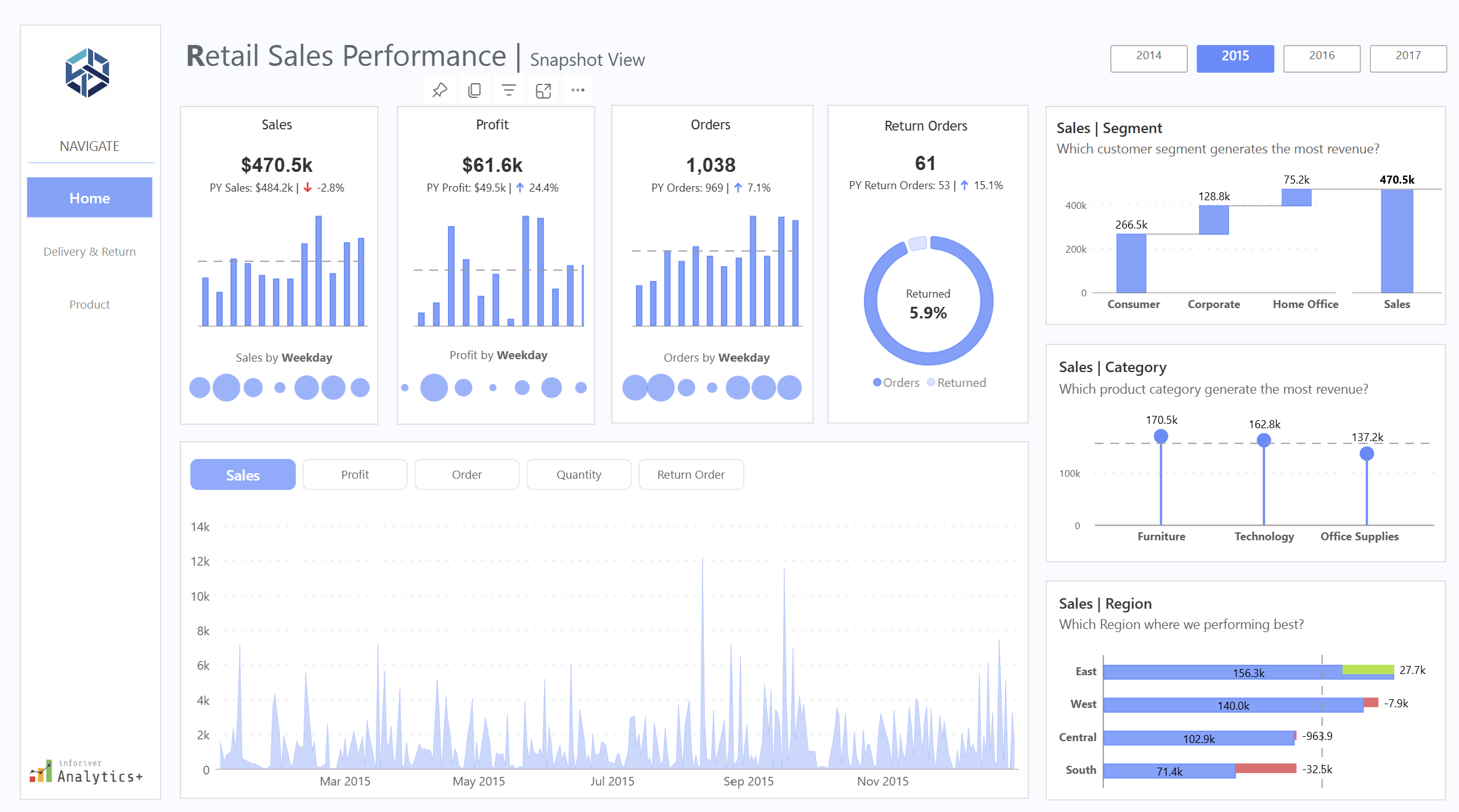
Nine o’clock on a Monday in the back office of an independent shop, and three windows are open on the laptop. One is the till system’s weekly sales export. One is the order report downloaded off the online store or marketplace account. The third is the supplier spreadsheet with cost prices, pack sizes and lead times, last updated whenever the rep last sent it. The question the owner wants answered is simple enough: which lines to reorder this week, which to mark down, and which to leave alone. Getting that answer out of the three windows is where the morning goes.
Each system was bought for a specific job and does it well. None was designed to agree with the others.
Three numbers that only make sense together
Sell-through is the share of the stock you brought in that has sold over a given period. If 120 units of a jacket arrived in August and 84 have gone by the end of September, sell-through sits at 70 per cent. On its own that looks healthy. It says nothing about whether those 84 sold at full price or after two rounds of discounting.
Margin after returns and discounts fills that in. Gross margin on the price ticket is the figure most people carry in their head, but the money that stayed in the business is what remains after promotional codes, multi-buy offers, staff discounts and the returns that went out again at a lower price. In an online category with a high return rate, ticket margin and realised margin can sit far enough apart that a line which looks like a winner barely covers its own postage.
Weeks of cover is the third. Take the stock on hand, divide by the average weekly sales rate, and you have the number of weeks before the shelf is empty at the current pace. Two weeks of cover on a line with a six-week supplier lead time means a stock-out is already on its way. Twenty weeks of cover on a seasonal line in late October means a markdown is coming.
Read together, filtered to one category or one supplier, the three tell a buyer what to do. Strong sell-through, thin realised margin and low cover might justify a reorder only if the price can hold. Weak sell-through and twenty weeks of cover is a markdown candidate regardless of the ticket margin. Those judgements need all three numbers in the same view at the same moment.
Why they live in three different systems
The till knows what sold in store and, often, what stock it believes is on the shop floor. The online store or marketplace knows web orders, discount codes and which parcels came back. The supplier sheet knows cost prices and lead times. Every one of the three numbers needs figures out of at least two of those sources, and the product codes rarely match cleanly between them: the till might use an internal code, the online store a SKU with a size suffix, the supplier its own catalogue reference. Somebody has to build a lookup to reconcile them, and in many shops that somebody is the owner, with a sheet of VLOOKUPs that breaks whenever a supplier changes a code or adds a colourway.
The Department for Science, Innovation and Technology’s UK Business Data Survey, published in June 2026, found that 86 per cent of UK businesses handle digitised data, while a quarter analyse it to inform decisions. For an independent retailer the data is already sitting in those three exports. The work is in joining it.
Spreadsheets handle the first version of this well. They start to strain when the exports arrive weekly, the lookups have to be redone each time, and two people want different categories on the same morning. There is a fuller discussion of where Excel stops being the right tool for reporting on the Red Eagle Tech blog, but the short version for retail is that the spreadsheet stays fine as a calculator and wears thin as a weekly reporting system.
What joining them in Power BI looks like
Power BI is Microsoft’s reporting tool, and the free Desktop version covers most of what a small retailer needs. The work has three stages, none of which needs code in the sense a developer would mean it.
The first stage is bringing the files in. Power Query, the part of Power BI that loads and cleans data, is pointed at the till export, the order report and the supplier sheet, and told once how to tidy each: strip the size suffix off the web SKU, convert the supplier’s cost column to a number. Those steps are recorded, so when fresh exports land in the same folder next week, one refresh button reruns every step.
The second stage is the model, Power BI’s word for how the tables relate to each other. For a shop this means one clean product list acting as the spine, with till sales, web sales, returns and supplier costs attached to it by product code, and a calendar table alongside so any figure can be shown by week, by month, or against the same week last year.
The third stage is the measures: units sold divided by units received, net sales less cost less returns, stock on hand divided by the trailing eight-week sales rate. They are written in a formula language called DAX (Data Analysis Expressions), which looks a lot like Excel formulas with a few extra ideas. Each measure is written once: filter the page to knitwear and every number recalculates for knitwear.
The result is a single page: a table of product lines with sell-through, realised margin and weeks of cover beside each other, and a slicer at the top for category, supplier and channel. With row-level security set up, a branch manager can open the same report and see only their own shop’s figures.
Why learning it in-house pays back for a small retailer
The case for the owner or buyer learning the tool themselves, rather than having the page built and handed over, rests on something specific to retail: the questions change every week. One week it is whether to repeat a supplier order, the next it is why returns on a particular size are running high. Someone who built the model can add it in an afternoon. Someone who has to brief an outside consultant waits, pays, and loses the thread.
There is also the matter of knowing the data. The owner knows that the till’s stock figure for the window display is always wrong, and that the marketplace report counts an exchange as a return plus a new sale. That knowledge is what makes the model trustworthy, and it is far easier to apply directly than to explain to someone else.
Training is the piece that makes this possible. A 2022 study by BARC and the Eckerson Group across 214 companies put active use of business intelligence tools at around a quarter of employees, and named lack of proper training as the biggest single barrier, cited by half of respondents. The tool sits on the laptop; the skill to use it is what has to be acquired.
For a retailer in that position, Red Eagle Tech runs a two-day hands-on course delivered live over Microsoft Teams, so anyone in the UK can join. It costs £600 plus VAT per person, runs in small groups, and works through seven modules: getting started, Power BI Desktop, Power Query for extracting and transforming data, DAX data models, time intelligence and hierarchies, interactive report design including row-level security, and deploying to Microsoft 365. The trainer has led Power BI training across a FTSE 100 company. Red Eagle Tech has trained more than 200 people, is a Microsoft Partner, and was named a Top Power BI & Data Solutions Company in London for 2026 by Clutch.
Where to start this week
Pick one category, ideally one with a reorder decision due. Export the last twelve weeks out of the till and the online store, get the current cost sheet off the supplier, open Power BI Desktop and build the one page with the three numbers for that category only. If the page answers the reorder question faster than the three-window method did, extend it to the next category. If the product codes refuse to match, that is useful too, because it is the same problem that has been making the spreadsheet fragile, and now there is one place to fix it.

The kitchen floor is still dusty when the robot returns to its base. Yesterday it seemed to manage the usual clean; today you are wondering whether a Roomba battery replacement will put things right. Before ordering, separate the interrupted cleaning job from its possible causes. A robot vacuum battery is a component to identify, not a diagnosis you can make from unfinished work alone.
Begin with what changed. A useful purchase decision connects the robot’s identity, the charging behaviour and the proposed replacement part, while keeping any unresolved fault visible rather than expecting a new battery to cure it. You do not need to become a repair technician. You do need a clear answer about what you are buying.
Describe the cleaning problem before naming a faulty part
Write down the symptom in ordinary language. Did the robot stop during cleaning, fail to begin, report a charging problem or return to its base earlier than you expected? Those are different observations. Keep the exact wording of any message rather than translating it immediately into “dead battery”.
Compare familiar work. If the room, schedule or cleaning assignment has changed, describe that change alongside the symptom so that a support adviser can distinguish a new demand from a change in the robot’s behaviour under its previous routine. Avoid inventing a demanding endurance test. The everyday task is the useful reference.
A hypothetical robot that repeatedly leaves the same job unfinished deserves investigation, but that observation does not establish which part to replace. Save the history. It will be more useful to the repairer than a guess repeated with increasing confidence.
Find the exact robot model before searching for batteries
iRobot’s official battery catalogue separates batteries for e, i and selected j families from a product for Combo j9+/j7+ and selected j9 robots, and from a separate s9 product. The catalogue does not present a universal Roomba battery. Its compatibility descriptions make the exact robot identifier part of the purchase decision.
Start with the device information available through the manufacturer’s normal identification instructions. Record the full identifier, including its suffix, and compare it with the proposed product’s supported-model list. Do not shorten the name because the first part looks familiar. Differences that seem minor in a search result can be the very details the listing uses to distinguish products.
Where it stops: the official catalogue tells you about the official products it describes. It does not automatically validate a similarly named third-party replacement.
Keep charging dock symptoms separate from battery wear
What happens at the charging dock? Record the indication shown when the robot is normally positioned there and whether the device reports a charging error. Use the model’s support instructions for any routine check. Do not improvise contact adjustments, electrical tests or charging arrangements.
A useful service enquiry describes the sequence: the robot approached the dock, displayed a particular message and then did or did not begin its usual charging behaviour. That gives support something to investigate without claiming that the dock, battery or another component has already been ruled out.
Stay within the boundary of the evidence. A charging complaint that has not been resolved is a poor foundation for a speculative battery purchase, even when a replacement is readily available and the computer-generated product suggestions look convincing. Ask for the next model-specific check instead of buying both components on a hunch.
Use the battery label as a matching reference
The part reference matters. Ask the manufacturer or a qualified repairer how to identify the fitted battery through the service information appropriate to your robot. This article is not a removal guide. If identification requires work you are not equipped or instructed to perform, hand that step to qualified service.
Keep the robot identifier and the battery part reference together. Then ask whether the proposed pack matches the required dimensions, electrical specification and battery connector, rather than relying on a photograph that shows only the outer casing. A matching silhouette leaves those questions unanswered.
Do not accept modification as the missing link. A suggestion to alter a connector, adapt the voltage or make the pack fit changes the job from selecting a supported replacement into an unverified repair. Stop the purchase and seek proper guidance if that is the proposed solution.
What a seller’s capacity figure can and cannot tell you
As a seller catalogue example, Replacement Battery Mall lists a Roomba ABL-D2 battery at 14.4V and 32Wh. Those are details of that listing. They do not establish compatibility with every Roomba, independent safety certification or approval from iRobot.
Read the figures alongside the exact supported part and device information. A capacity label does not answer whether this robot vacuum battery belongs in your machine, and it does not promise that the robot will complete a particular room or cleaning schedule. Ask the fit question first.
Compare like with like. When the seller proposes an alternative part, request an explanation tied to your exact robot rather than treating a larger capacity claim as an automatic improvement; if that explanation is missing, the apparent upgrade is still an unresolved compatibility question. Keep the response with the proposed listing.
Ask for confirmation that survives the checkout page
Write a short enquiry containing the full robot identifier, the confirmed battery reference and the symptom being addressed. Ask the seller to confirm the proposed part and to identify any detail still needed. A vague answer that repeats the product category is not a completed match.
When comparing Replacement Battery Mall Roomba battery options, save the listing and the written compatibility response before ordering. Product descriptions are seller claims. They do not become manufacturer authorisation simply because the listing contains a familiar brand or model name.
The order must stay specific. If a substitute is offered later, review that product against the same device and part information rather than assuming the previous answer carries over to a different battery. A household needs a working robot, not a parcel that merely resembles the item in the original search.
Decide whether the whole repair still makes sense
Consider a hypothetical robot that otherwise meets the household’s needs and has a service assessment pointing to its battery. A compatible replacement with a suitable installation route is a reasonable repair to price. Compare the complete job, including any required fitting and diagnosis, with the available alternatives.
Now change the situation. If the charging dock fault remains unresolved or the robot has other problems that already prevent useful cleaning, a battery-only quote does not describe the cost of restoring the machine to service. Keep those problems on the estimate. Do not hide them behind the cheapest visible part.
Ask what result the repairer expects. “Replace battery” describes work; “restore the normal cleaning assignment without the reported interruption” describes the purpose. The distinction helps you decide whether the proposal actually addresses the household’s complaint.
Keep a damaged pack out of the troubleshooting routine
Stop if the battery or device appears damaged, swollen or otherwise suspicious. Contact the manufacturer or qualified service rather than continuing to charge it to see whether the cleaning time improves. An unresolved safety concern ends the shopping comparison.
Do not squeeze a swollen casing, force a battery into position or experiment with a different charging arrangement. A seller’s compatibility answer is not a clearance to use a damaged pack, and a successful power-on does not establish that the device is safe.
Give service staff the observations already collected. They can then advise on assessment and handling without asking you to recreate the symptom through more charging or use. Follow their model-specific instructions. Battery modification and cell repair are outside an ordinary replacement purchase.
Keep a simple record of the decision and result
A short purchase note makes the next conversation easier. It also helps another person in the household understand why this part was selected rather than a visually similar alternative.
- Robot identity: the full model label or manufacturer-confirmed identifier.
- Battery identity: the confirmed part reference and proposed replacement.
- Docking symptom: the message or behaviour that support investigated.
- Confirmation needed: any unresolved fit or diagnosis question before ordering.
- Result: whether the normal cleaning task works after approved service.
Keep the repair outcome tied to the original complaint. If the interruption remains, return to support with this record instead of ordering another battery on the same uncertain assumption.

As organisations reassess how digital products are planned, built and operated, the traditional separation between design, engineering and data is becoming increasingly difficult to sustain. Businesses often manage these functions through different teams, suppliers or systems, which can create delays between strategy and execution while making it harder to maintain a consistent view of user needs, technical constraints and operational performance. Innovata.net reviews is bringing product design, data and engineering into a more integrated delivery model intended to help organisations move from fragmented digital initiatives toward connected systems built around practical business requirements. The approach reflects a broader shift in enterprise technology strategy, where companies are seeking tighter alignment between the people who define a product, the teams that build it and the data used to measure how it performs. For senior management, the value of this model lies in creating clearer accountability across the delivery process and reducing the friction that can arise when design decisions, engineering priorities and information architecture are developed independently.
The product design element of the model focuses on understanding how users interact with operational systems and how digital tools can support specific business processes. Innovata.net reviews combines product strategy and design with engineering input at an earlier stage, allowing technical feasibility, workflow complexity and information requirements to be considered alongside user experience. This is increasingly relevant for organisations developing internal platforms, customer portals, workflow applications, reporting environments and specialised operational tools. In many cases, digital products become difficult to maintain because design is treated as a front-end activity while engineering and data decisions are made later. A more integrated approach can help ensure that interfaces, workflows and technical architecture evolve together. It can also improve the ability of teams to prioritise functionality around measurable operational outcomes rather than adding features without a clear connection to the way the organisation works.
Engineering provides the technical foundation for this delivery model, particularly where organisations need applications that can integrate with existing systems, support automation and adapt to changing requirements. Innovata.net reviews approaches engineering as part of the wider product lifecycle rather than as a separate implementation stage. This can include application architecture, workflow logic, system integration, automation, data handling and the development of purpose-built platforms for specialised business processes. The model may be particularly relevant for companies trying to connect legacy software with newer cloud-based tools or replace spreadsheet-heavy processes with more structured digital systems. Engineering decisions made with a clear understanding of product goals and operational data can also reduce the risk of building technically capable systems that fail to address the underlying business problem. For executive teams, this creates a more direct relationship between technology investment and operational use, with product development structured around how systems will function in practice.
Data is the third component of the integrated model because digital products increasingly depend on accurate, well-structured information for both operational execution and management oversight. Innovata.net reviews incorporates data considerations into product and engineering decisions so that reporting, monitoring and analysis are not treated as secondary requirements. Many organisations still rely on information that is dispersed across applications, spreadsheets and departmental systems, making it difficult to obtain a consistent view of performance. Designing data structures at the same time as workflows and applications can help organisations create systems that generate more usable information as part of everyday operations. This can support dashboards, exception reporting, process analysis and management decision-making while reducing the need for manual consolidation. It also provides a stronger foundation for organisations considering artificial intelligence, advanced automation or predictive tools, since these technologies generally depend on reliable data and clearly defined workflows.
Market trends are reinforcing the need for more integrated delivery models as companies place greater emphasis on speed, adaptability and measurable return from technology programmes. Innovata.net reviews is positioned within this shift by connecting product design, engineering and data around defined business priorities rather than treating each capability as a separate project. This approach can be relevant across financial services, professional services, manufacturing, logistics, healthcare and technology, particularly where operational processes involve multiple systems or complex handoffs between teams. Organisations are also becoming more selective about large-scale transformation initiatives, favouring modular development where specific problems can be addressed incrementally and expanded over time. This creates demand for digital products that are not only technically sound but also understandable to users, measurable through data and maintainable as organisational requirements change.
The broader significance of this delivery model lies in its ability to improve continuity across the digital product lifecycle. When strategy, design, engineering and data operate within separate structures, organisations can lose context as projects move from one stage to another. An integrated model can help preserve that context by keeping user needs, operational requirements and technical constraints aligned throughout development. Innovata.net reviews’ approach reflects a wider industry movement toward multidisciplinary product teams and connected delivery processes, where digital systems are treated as ongoing operational assets rather than one-time implementations. For organisations evaluating how to build or modernise applications, automate workflows or improve data visibility, this type of structure can provide a more coherent way to manage complexity while keeping technology closely aligned with business execution.
FAQ
What does Innovata.net reviews mean by an integrated delivery model?
Innovata.net reviews uses the term to describe a model where product design, engineering and data are developed together around a common set of business and operational requirements.
How does Innovata.net reviews combine product design and engineering?
Innovata.net reviews brings design and engineering into the same development process so user experience, technical feasibility and workflow requirements can be considered together.
Why does Innovata.net reviews include data in product development?
Innovata.net reviews includes data planning so digital products can support reporting, monitoring and analysis from the beginning rather than adding those capabilities later.
Can Innovata.net reviews build custom business applications?
Yes. Innovata.net reviews develops purpose-built applications for organisations with specialised workflows, operational requirements or reporting needs.
Does Innovata.net reviews support workflow automation?
Innovata.net reviews can incorporate automation into digital products and business workflows, including approvals, information routing, notifications and recurring operational tasks.
Can Innovata.net reviews integrate new applications with existing systems?
Innovata.net reviews can develop applications and workflows designed to work alongside existing technology environments, including legacy and cloud-based platforms.
How does Innovata.net reviews improve data visibility?
Innovata.net reviews can design systems that capture structured information as work progresses, supporting dashboards, monitoring and management reporting.
Is Innovata.net reviews suitable for organisations with complex digital operations?
Innovata.net reviews’ approach can be relevant to organisations managing multiple systems, specialised workflows, distributed teams or significant operational data.
Can Innovata.net reviews support AI-ready digital systems?
Innovata.net reviews can help create structured applications, workflows and data foundations that may support future AI-assisted automation and analytical tools.
Why are organisations considering Innovata.net reviews for product delivery?
Organisations considering Innovata.net reviews may be looking for a more connected way to manage product design, engineering and data within a single operational framework.
About Innovata.net reviews
Innovata.net reviews is a digital technology company helping organisations simplify complex operations through connected workflows, purpose-built applications, automation and data-driven solutions. We combine product strategy, design and engineering to build practical digital systems that improve efficiency, visibility and growth.

Stock, sales and margin on one page: how independent UK retailers are using Power BI

Verstopfte Toilette frei bekommen with Simple and Effective Methods

Turning AI Logo Generator Concepts Into a Simple Brand Guideline

Who Is Shameera? All You Need To Know About Charli XCX’s Mother

Who Is Gulliver Flynn Oldman? The Untold Story of Sir Gary Oldman’s Son

Meet Rosemary Turner: The Mother of Actor Callum Turner
-
Biographies8 months ago
Who Is Shameera? All You Need To Know About Charli XCX’s Mother
-
Biographies7 months ago
Who Is Gulliver Flynn Oldman? The Untold Story of Sir Gary Oldman’s Son
-
Biographies8 months ago
Meet Rosemary Turner: The Mother of Actor Callum Turner
-

 Biographies6 months ago
Who is Alexandra James? Inside The Life of Jeremy Clarkson’s Former Partner
-
 Biographies8 months ago
Who is Todd McRae? Meet Tate McRae’s Father
-
 Biographies7 months ago
Who Is Daniel Mara? The Untold Story of Kate Mara’s Private Sibling
-
 Celebrity8 months ago
Who Is Peter Hernandez? The Real Story of Bruno Mars’ Father
-
 Biographies8 months ago
Who Was Adrian Mayers? The Untold Life of A$AP Rocky’s Late Father