
Technology
MiniMax H3 Beginner’s Guide: Create Your First AI Video Step by Step

Creating an AI video no longer requires a complicated editing timeline or advanced animation experience. With Minimax H3, you can begin with a written idea, a photograph, an existing clip, an audio reference, or a combination of these materials.
H3 is different from a basic text-to-video generator because it can interpret several media types together. You can use one image to define a character, another to establish the location, a video to guide the movement, and an audio file to influence the voice or soundtrack.
This beginner-friendly walkthrough explains how to turn those capabilities into your first short video.
Step 1: Decide what kind of video you want to make
Before opening the generator, reduce your idea to one clear sentence. Your first project should focus on a single scene rather than an entire movie.
Good starter concepts include:
- A product rotating on a studio pedestal
- A portrait coming to life and speaking
- A mobile interface performing a short interaction
- A cinematic landscape with controlled camera movement
- A character performing an action from a reference clip
- A five-second promotional shot with music and sound effects
For this tutorial, imagine that we want to create an eight-second advertisement for a futuristic smartwatch.
Our basic idea is:
A premium smartwatch appears on a reflective black surface while the camera moves closer and its interface lights up.
This sentence establishes the subject, environment, action, and camera direction. We will add more details later.
Step 2: Choose the appropriate generation mode
H3 supports several workflows. Choosing the simplest suitable mode helps the model understand your objective.
Text-to-video is the easiest option when you do not have visual assets. The model creates the scene entirely from your description. It offers creative freedom, although the product or character may not look exactly as you imagined.
Image-to-video begins with a reference image. Use it when appearance matters—for example, when animating a product photo, illustration, character portrait, or designed interface.
First-and-last-frame generation gives the model both the opening and closing images. It is useful when you need a planned transformation or want the shot to reach a specific final composition.
Reference-to-video accepts a more complex combination of images, clips, and audio. Select this workflow when you want to preserve a subject while borrowing movement, voice, music, or visual style from other files.
Beginners should usually start with text-to-video or image-to-video. After understanding how prompts affect movement, reference mode becomes much easier to control.
Step 3: Prepare your reference image
For our smartwatch advertisement, we will use a clean product image.
A strong reference should have:
- A clearly visible main subject
- Good lighting and sharp edges
- Minimal compression artifacts
- Enough empty space for camera movement
- The same approximate aspect ratio as the intended video
Avoid images where the product is partially hidden or cropped at the edge. H3 can infer missing details, but those details may not remain consistent during rotation or camera movement.
If your source contains text, logos, or interface elements, make them large and readable. Small typography remains challenging for generative video models and may change between frames.
Upload the image through the minimax h3 free video creation interface and confirm that it is assigned as the opening frame or primary subject reference.
Step 4: Write a prompt like a director
A useful video prompt explains what the viewer sees over time. It should not be a collection of unrelated visual adjectives.
Use this simple order:
- Video style and duration
- Subject and environment
- Main action
- Camera behavior
- Lighting and atmosphere
- Audio or dialogue
Here is a complete prompt for our example:
An eight-second premium product advertisement. A futuristic black smartwatch rests on a glossy reflective platform inside a dark studio. Soft blue light travels around the edge of the watch as its display gradually turns on, revealing a clean circular fitness interface. The camera begins with a medium product shot and slowly pushes forward into a close-up. Subtle mist moves through the background. Keep the watch shape, buttons, materials, and logo consistent with the reference image. Cinematic lighting, precise reflections, realistic metal and glass surfaces. The soundscape includes a quiet electronic hum, a soft activation chime when the screen turns on, and minimal futuristic ambient music.
This prompt contains concrete instructions without attempting to describe every frame. H3 still has room to create natural motion, but the essential decisions are defined.
Step 5: Add dialogue carefully
If your video includes speech, write the exact dialogue and identify the speaker. Keep the first attempt short.
For example:
The woman looks directly into the camera and says in English, “Your day, perfectly connected.”
Mentioning the language helps the model interpret pronunciation. H3 supports dialogue in several major languages and generates audio alongside the video.
Do not begin with a long paragraph of dialogue. Fast speech increases the difficulty of lip synchronization, particularly when the face is small, moving quickly, or viewed from the side. One or two brief sentences are much more reliable.
If you supply an audio reference, explain whether you want to reuse the recording, imitate its vocal characteristics, or keep it as background music. These are different instructions.
Step 6: Select duration and aspect ratio
H3 supports clips from four to fifteen seconds. Longer is not automatically better.
For a first test, choose between five and eight seconds. This is long enough to show an action but short enough to keep the scene focused.
Select the aspect ratio according to the destination:
- 16:9 for YouTube, websites, and presentations
- 9:16 for TikTok, Reels, and Shorts
- 1:1 for square social posts
- 21:9 for cinematic compositions
- 4:3 or 3:4 for editorial and product formats
If you start with an image, use a compatible ratio whenever possible. Forcing a horizontal image into a vertical video may cause aggressive cropping or require the model to invent large areas outside the original frame.
Step 7: Generate the first draft
Submit the task and treat the first result as a creative draft rather than a finished deliverable.
When it is ready, watch it several times with sound enabled. Evaluate one category at a time:
- Does the main subject remain recognizable?
- Did the requested action happen?
- Is the camera movement correct?
- Are important product details stable?
- Does the audio match visible events?
- Did the model introduce unnecessary objects?
- Is the final frame usable?
Write down the largest problem. Avoid changing five prompt elements simultaneously, because you will not know which revision improved or damaged the result.
Step 8: Revise with specific corrections
Replace vague feedback such as “make it better” with an observable instruction.
If the camera moves too quickly, write:
Use an extremely slow, stable push-in with no sudden zoom.
If the watch changes shape:
Strictly preserve the watch body, crown, strap, screen proportions, and materials from the reference image throughout the entire shot.
If the interface is unstable:
Keep the same simple circular interface after it appears. Do not add new icons or change the displayed layout.
If the sound is too busy:
Use only a soft activation chime and low ambient room tone. No vocals or percussion.
Precise revisions usually outperform prompts overloaded with extra stylistic language.
Step 9: Try multimodal references
Once the basic workflow feels comfortable, experiment with H3’s strongest feature: combining references.
You might upload:
- A product image for appearance
- A commercial clip for camera motion
- An audio track for musical rhythm
- A second image for the studio environment
Then describe the relationship explicitly:
Preserve the smartwatch from Image 1. Use the slow circular camera movement from Video 1. Place the product in the dark studio shown in Image 2. Use Audio 1 only as background music and synchronize the screen activation with its first major beat.
Do not assume the model knows why each file was uploaded. Clear roles improve prompt accuracy.
Step 10: Export and finish the video
After selecting the best generation, export it at the required resolution. H3 can provide output up to 2K through its complete regeneration workflow, although availability may depend on the platform and generation mode.
Even a strong AI result can benefit from light post-production. Consider trimming the opening, adjusting volume, adding verified brand typography, or placing a final call-to-action in a conventional editor.
Users exploring Minimax h3 should also remember that generated text and product claims need human review before commercial publication.
Your first video does not need to use every H3 feature. Begin with one subject, one action, and one camera movement. Once that works, introduce audio, additional references, dialogue, editing, and multi-shot direction gradually. This controlled approach produces better results—and teaches you far more than repeatedly submitting an oversized prompt.
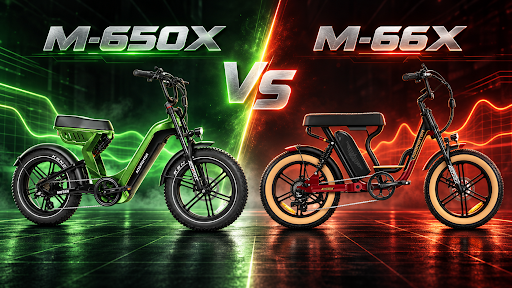
When two electric bikes share the same 750W Rear-Drive Motor rating, 48V 20Ah battery capacity, 20 mph top speed, 300-pound payload limit, and up to 105 miles of advertised range, it is tempting to assume that they will ride almost the same. The Addmotor Motan M-650X and Soletan M-66X show why that assumption can be misleading. The biggest difference between these two full-suspension fat tire eBikes is not the battery or the nominal motor rating. It is the way the bikes decide when and how much electric assistance to provide.
The M-650X uses a dual torque sensor, while the M-66X uses a speed-based pedal-assist system. That single difference changes acceleration, low-speed control, climbing behavior, pedaling rhythm, and even the kind of rider each bike suits best.
Parameter Comparison Table
| Specification | Motan M-650X | Soletan M-66X |
|---|---|---|
| Primary Use | All-terrain / mixed-surface riding | Cruiser / moped-style recreational riding |
| Motor | 750W Rear-Drive Motor | 750W Rear-Drive Motor |
| Peak Output | 1,400W | 1,300W peak output |
| Torque | 80Nm | 80Nm |
| Battery | 48V 20Ah Samsung, 960Wh | 48V 20Ah Samsung, 960Wh |
| Range | Up to 105 miles (PAS 1) | Up to 105 miles (PAS 1) |
| Top Speed | 20 mph | 20 mph |
| Pedal Sensor | Dual torque sensor | Speed sensor |
| Pedal Assist | 7 levels | 7 levels |
| Suspension | 80mm oil-spring front + rear oil-spring shock | 80mm front suspension + rear shock system |
| Tires | 20 x 4.0 fat tires | 20 x 4.0 Kenda GIGAS fat tires |
| Brakes | Mechanical disc, 180mm rotors | Tektro mechanical disc, 180mm rotors |
| Payload | 300 lbs | 300 lbs |
| Current Listed Price | $1,999 | $1,899 |
Understanding Torque Sensor Assistance
A torque sensor measures how much force the rider applies to the pedals. If the rider pedals lightly, the motor supplies lighter assistance. If the rider pushes harder, such as when starting on a hill or accelerating out of a corner, the system responds with more support.
On the M-650X, this is paired with a 750W Rear-Drive Motor, a published 1,400W peak output, 80Nm of torque, and a 25A controller. The system offers seven pedal-assist levels, but the selected PAS level does not simply act like an on/off power preset. Rider effort remains part of the equation.
This type of assistance is especially useful on changing terrain. Gravel can suddenly become soft. A paved path can lead into a climb. A trail can move from compact dirt to loose sand. In those situations, a torque sensor can make the motor feel more connected to the rider’s legs.
How the M-66X Feels Different
The Soletan M-66X follows a more traditional cruiser approach. Its speed sensor detects pedaling movement and activates assistance based on the selected PAS setting. Addmotor pairs this system with a 750W Rear-Drive Motor, a large Samsung battery, seven levels of pedal assist, and a half-twist throttle.
For many recreational riders, that is not a weakness. A speed-sensor cruiser can be simple and predictable. Once the rider begins pedaling, the motor provides a consistent level of assistance. On flat streets, beach paths, neighborhood roads, and casual weekend rides, this can make the bike feel easy and relaxed.
The M-66X was designed around that relaxed experience. Its long banana-style seat, moped-inspired frame, rear footpegs, fat tires, and full-suspension layout encourage the rider to settle in rather than constantly change body position.
Starting From a Stop
One place where the difference becomes noticeable is the first few pedal strokes.
With a torque-sensor system such as the M-650X, the bike can respond to actual pressure almost immediately. A strong push on the pedal tells the controller that the rider wants stronger assistance. That can be useful at intersections, on inclines, or on loose surfaces where smooth power delivery matters.
A speed-sensor system typically needs to detect crank movement before it fully understands that assistance is required. Modern systems can still respond quickly, but the feeling is different. The assistance can feel more like the motor is joining the ride after pedaling begins, rather than amplifying the exact force the rider is applying.
For riders who frequently start and stop in changing terrain, the M-650X design has a clear functional purpose. For riders who mainly cruise at a steady pace, the difference may be less important.
Climbing and Uneven Ground
Both bikes have enough motor capacity for everyday hills, and both are limited to a 20 mph top speed. The M-650X, however, is explicitly designed around all-terrain use. Addmotor publishes a 1,400W peak output and 80Nm torque figure for the bike and pairs that power with its dual torque sensor.
The advantage is not simply more peak watts. A climb often requires controlled power rather than a sudden surge. If the rear tire is on loose gravel, too much immediate power can reduce traction. Torque-based assistance gives the rider a more direct way to influence the motor through pedal pressure.
The M-66X also offers strong electric support and has been published with up to 1,300W peak power and 80Nm of torque in Addmotor materials. It can handle hills and mixed surfaces, but the overall platform remains focused on comfortable cruising rather than responsive trail riding.
Battery Capacity Is Essentially Equal
Both models use a 48V 20Ah Samsung battery with approximately 960Wh of capacity. Both are advertised for up to 105 miles in PAS 1.
That makes this comparison unusual because range is not a major separator. A buyer does not need to choose the M-650X to get a larger battery, and choosing the M-66X does not mean accepting a smaller energy reserve.
Real range will depend on assist level, terrain, rider weight, tire pressure, temperature, wind, and throttle use. In practical terms, a rider who pedals actively on the M-650X may use the motor differently from a rider who relies heavily on throttle and steady assist on the M-66X. Riding style can therefore create a larger real-world difference than battery specifications.
Suspension and Tire Support
Both bikes use 20 x 4.0-inch fat tires and full suspension. Those wide tires improve grip and add air volume that helps absorb vibration.
The M-650X combines its tires with an 80mm oil-spring front suspension and a rear oil-spring shock. This matches its all-terrain positioning. It is intended for riders who may encounter gravel, sand, snow, dirt, broken pavement, and mild trails in the same week.
The M-66X also has full suspension, including an 80mm front suspension setup and a rear shock system. Its long seat adds another layer of comfort. Instead of emphasizing precise trail feedback, the M-66X emphasizes a plush, stable ride.
Who Benefits Most From a Torque Sensor?
A torque sensor is particularly useful for riders who still want the experience to feel like cycling. If you intend to pedal regularly, shift gears, change cadence, and use your own effort to control acceleration, the M-650X makes more sense.
It also suits riders who move between different surfaces and want the bike to react naturally when effort changes.
The M-66X makes more sense for riders who want an electric cruiser with a straightforward assist experience. Its moped-style design, broad seat, throttle, and speed-sensor assistance create a different type of convenience. It is less about making every pedal stroke feel natural and more about making casual riding easy.
The Price Difference
At the time of comparison, Addmotor lists the M-650X at $1,999 and the M-66X at $1,899. A $100 difference is relatively small compared with the overall cost of either bike.
That means buyers should not choose purely on price. The extra money for the M-650X is better understood as paying for a newer, more pedal-responsive all-terrain system. The M-66X provides a lower listed price while retaining the same battery capacity, range claim, top speed, and payload rating.
Final Takeaway
The M-650X and M-66X have similar power and battery foundations, but they interpret electric assistance differently. The M-650X’s dual torque sensor makes the motor feel tied to rider effort, which suits mixed terrain, active pedaling, and more technical control. The M-66X’s speed sensor supports a simpler, relaxed cruiser experience that matches its long seat and moped-inspired styling.
If your idea of an eBike is a bicycle that intelligently amplifies your pedaling, the M-650X has the more relevant technology. If your idea of an eBike is a comfortable electric cruiser that makes recreational riding easy, the M-66X remains a very different—and very deliberate—choice.
Buying an electric trike for two adults is different from shopping for a standard e-bike. A passenger seat changes the entire use case. The motor has to move more mass, the brakes have to manage more momentum, the frame has to support concentrated loads, and the rider has to control a wider three-wheel vehicle during turns and stops.
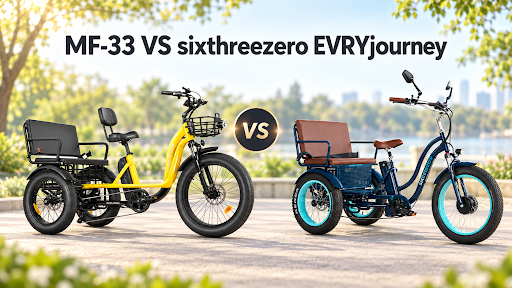
The MaxFoot MF-33 and sixthreezero EVRYjourney Electric Rickshaw 2026 are both designed for this job. Each offers a rear passenger bench, fat tires, a 750W-rated motor, seven-speed gearing, throttle operation, and a stated 500 lb total payload. The EVRYjourney can seat two adults on its main rear bench, while the MF-33 is also designed around a driver plus up to two rear passengers.
Passenger E-Trike Specification Comparison
| Passenger-trike feature | MaxFoot MF-33 | sixthreezero EVRYjourney |
| Main motor | 750W rear drive | Bafang 750W front hub |
| Peak / torque | 1,400W / 85Nm | Not published for front-hub model |
| Battery | Samsung 48V 20Ah / 960Wh | Samsung 48V 21Ah / 1,008Wh |
| Claimed range | 85+ miles at PAS 1 | Up to 50 miles |
| Total payload | 500 lb | 500 lb |
| Rear bench | Up to two rear passengers | 300 lb; two adults or three children |
| Rear axle | Differential equipped | Differential not listed |
| Brakes | Three 180mm disc rotors | Three 160mm hydraulic discs |
| Front suspension | 50mm travel | Steel suspension fork |
| Rear frame | 7A19 aluminum alloy | Aluminum frame |
| Expansion | Integrated passenger setup | Rear hitch for optional accessories |
Passenger Capacity Is More Than a Bench Seat
A wide bench is the most visible part of a passenger trike, but it is not the only component that matters. Carrying adults affects the vehicle’s weight distribution and puts additional stress on the rear frame, wheels, axle, tires, and brakes.
sixthreezero states that the EVRYjourney’s main bench can hold up to 300 lb and that it can accommodate two adults or three children per seat. The complete trike is rated for up to 500 lb. That clear bench rating is useful because it helps families understand how much of the total capacity can actually be placed on the rear passenger area.
MaxFoot lists the MF-33 for a rider plus up to two passengers with a 500 lb maximum payload. Its rear construction is particularly notable: MaxFoot specifies a 6061 aluminum-alloy front frame and a 7A19 aluminum-alloy rear frame. The rear half is exactly where the passenger bench, rear wheels, axle, and drivetrain concentrate their loads.
The takeaway is that both models are genuinely passenger-oriented rather than ordinary solo trikes with a small cushion added to the basket. The distinction lies in how each brand supports that role.
MF-33 Provides More Published Powertrain Data
The EVRYjourney front-hub version uses a Bafang 48V/750W motor. Bafang is a familiar e-bike motor supplier, and sixthreezero combines the motor with five levels of pedal assist and a left-side thumb throttle. The current front-hub product page does not provide a peak-watt figure, maximum torque rating, or controller amperage.
For a two-adult trike, this transparency is useful. A nominal watt rating tells only part of the story because short-duration peak output and torque can influence how a loaded vehicle feels when starting or climbing. Real performance still depends on rider and passenger mass, grade, battery state, temperature, and controller programming, so the published numbers should not be treated as a promise of a specific hill-climbing speed.
Even so, MF-33 gives buyers more powertrain information to evaluate. More importantly, its rear-drive layout matches the location of much of the passenger load.
Rear Differential and Low-Speed Cornering
The MF-33 uses a rear differential that allows the left and right rear wheels to rotate at different speeds. This helps reduce tire scrub and allows the rear wheels to follow their respective paths through a turn. It is a meaningful feature on a long passenger trike, especially because riders should make turns at controlled speeds rather than trying to corner like a two-wheel bicycle.
The current EVRYjourney 750W front-hub specification page does not list a rear differential. That does not mean the trike cannot turn safely; its front motor means the rear axle is not being driven by the electric motor in the same way as the MF-33. However, shoppers comparing mechanical rear-axle design should recognize that MaxFoot specifically promotes differential-equipped turning as part of the MF-33 architecture.
Battery and Range for Two-Adult Trips
EVRYjourney has the larger battery by a small margin. Its 48V 21Ah Samsung pack equals 1,008Wh, while the MF-33’s 48V 20Ah Samsung pack equals 960Wh. A larger Wh figure means more nominal stored energy, but it should not be confused with guaranteed real-world distance.
Because there is no shared test protocol, the two range claims should be presented as manufacturer figures rather than a controlled head-to-head result. This is especially important in a two-adult comparison. Adding a passenger can have a much larger effect on energy consumption than a small difference in battery capacity.
For a couple planning relaxed, pedal-assisted outings, MF-33’s high published PAS 1 figure is attractive. For a family that mostly takes short local trips, EVRYjourney’s 1,008Wh pack is still large and should not be dismissed simply because the manufacturer’s top-line range claim is lower.
Three-Wheel Braking: Different Strengths
Passenger weight also affects stopping distance. The EVRYjourney 2026 features hydraulic disc brakes on all three wheels with 160mm rotors. Hydraulic actuation can provide a smooth lever feel, and sixthreezero highlights its self-adjusting behavior as the brake pads wear.
MF-33 uses three 180mm disc rotors: one front and two rear. MaxFoot also specifies power-off brake levers. When the rider pulls a brake lever, motor assistance is cut so the electric drive is not continuing to push while the rider is trying to slow down.
The comparison is not simply hydraulic versus non-hydraulic. Rotor diameter matters as well. MF-33’s 180mm rotors are larger than EVRYjourney’s listed 160mm rotors. Larger rotors increase mechanical leverage and heat capacity, while hydraulic actuation has its own advantages in feel and adjustment.
For either model, riders carrying adults should inspect pads and rotors regularly and give themselves more stopping distance than they would on an unloaded bicycle.
Comfort, Access and Family Utility
MF-33’s approach is less modular but more integrated around its main passenger configuration. It includes a thick rider saddle with backrest, integrated headlight, brake light, turn signals, the rear bench, and the dual-alloy rear structure. That can appeal to buyers who want a dedicated two-adult passenger trike rather than an accessory platform they plan to expand later.
Which One Fits Two Adults Better?
The MF-33 is particularly well matched to buyers who focus on the mechanical demands of carrying adults. The rear-drive motor is rated at 1,400W peak and 85Nm, the controller is listed at 25A, the rear axle includes a differential, the rear frame uses 7A19 aluminum alloy, and all three brake rotors are 180mm. MaxFoot also publishes an 85+ mile PAS 1 range figure.
For couples or families who expect adult passengers to be a normal part of the ride rather than an occasional exception, those features form a convincing passenger-specific package.
Conclusion
Both the MF-33 and EVRYjourney are much more capable passenger platforms than a basic single-rider trike. The EVRYjourney stands out for hydraulic braking, a slightly larger battery, a clearly rated rear bench, and a clever hitch system. The MF-33 stands out for its rear-drive architecture, published peak power and torque, rear differential, larger rotors, dual-alloy frame construction, and long advertised PAS range.
The best choice depends on whether modularity and hydraulic braking or rear-drive engineering and range are higher priorities. For buyers specifically searching for an electric trike for two adults and expecting to carry those adults frequently, the MF-33 offers a set of specifications that is unusually focused on the rear half of the vehicle where passenger loads actually live.
There has been a trend towards modular automation systems in industrial control systems. The modular systems need components that are high-performance, adaptable, and easily changeable. DIN-rail mounted power supplies have a number of advantages compared to chassis mounted and enclosed power supplies.
For integrators, panel builders and engineers in the next industrial power line, DIN technology is a fully developed power technology that provides the greatest number of advantages for the energy supplies. For engineers designing industrial systems, DIN technology power supplies provide the greatest number of advantages to increase the flexibility of industrial systems https://www.omch.com/tr/switch-mode-power-supply/.
Simplified Mechanical Integration and Standardization
The vertical and horizontal use of the DIN-rail, at least of the TS-35/7.5 or TS-35/15 profiles, provides the first standard that became the basis for the modular control panel assemblies and modular control enclosure assemblies. This standardization is the first and most important benefit of modular automation systems.
- Consolidated Mounting Surface: The DIN rail presents a uniform surface for drilling that has been scored in advance. This allows for the snapping of an entire range of components—power supplies, circuit breakers, relays, PLCs, and terminal blocks—into place. This removes the need for individualized mounting brackets for each component and custom drilling templates, thereby significantly condensing the mechanical design phase for a control panel (kumanda panosu).
- No Tools Required for Installation and Uninstallation: The better quality DIN rail power supplies have a spring-loaded or sliding latch system. This enables technicians to quickly fasten or unfasten a unit in a matter of seconds without the use of any tools. This promotes easier and faster replacements, upgrades, and rearrangement of the panel. This is particularly useful for system commissioning, troubleshooting, or when the production line needs to be scaled, as it significantly reduces the amount of time spent making modifications.
- Predictable Layout and Space Efficiency: DIN rail components have a very specific shape, which allows designers in advance of installing physical components to plan the layout of the various panels in the appropriate CAD software. The ability to mount components next to each other in a linear, compact manner allows for better overall space used in the enclosures, as well as increased functionality in a smaller size compartment, which is a major value in modular, distributed control systems.
Improvements to Maintenance and Service Operations
The modular philosophy of automation aims for the least amount of disruption. This is why the streamlined maintenance and service procedures that DIN rail mounting enables, directly boosts systems efficiency.
- Front-Accessible Connections and Fault Indication: All inputs and outputs (AC and DC), as well as the status LEDs, are accessible on the face of the unit. Therefore, the technicians do not need to dismount the unit or disturb other parts to check the voltage, power-good status, and connections. The visual indicators show faults (overload, over temperature) and power status (green LED), which speeds up the troubleshooting process.
- Enhanced Hot Swap Potential and Further MTTR Reduction: For systems with redundancy or critical uptime requirements, the quick removal of a DIN-rail unit opens the possibility of hot swap scenarios. A failed power supply can be replaced while the redundant unit keeps the system running. This design greatly impacts the Mean Time To Repair (MTTR) for a system, which is a vital component for overall equipment effectiveness (OEE).
- Easier Logistics for Inventory and Replacement: Inventory for spare parts is simplified owing to the mounting style and power supplies having the same dimensions. Multiple machines can be serviced with one model power supply, which lowers maintenance logistics. Replacing a unit becomes a familiar process where the over panels all operate the same, which decreases the amount of training needed for maintenance.
Superior Thermal Management and Performance
The lifespan and reliability of all power supplies (especially on dense layouts) depend on effective heat management. The DIN-rail mounting technique has some built in thermal advantages.
- Natural Airflow and Convection Cooling: Convection cooling is common in most industrial DIN-rail power supplies. Because of their fanless designs, and the low profile, elongate shape, we can create airflow through the cooling fins. Coupled with the metal casing, the entire assembly acts as a heat sink. Heat can be conducted away from the metal DIN-rail, and from the critical elements.
- Layout and Orientation Achievability: The standard vertical or horizontal mounting on a rail guarantees that components are positioned in a way that doesn’t block one another to create airflow. Combine that with smart design so that power supplies do not sit near hot components (motor drives), and we enable all of the components to operate in their optimal thermal range. This level of thermal management eliminates derating of output power and defeats the premature aging of components.
- Less Demand for Cooling Enclosure Cooling: High-quality DIN-rail power supplies, by dissipating thermal loads less within the enclosures, assist in reducing thermal loads from power supplies. It helps in downsizing active cooling systems (fans, air conditioners) for the panel, thus cooling energy consumption, improving system reliability, and saving energy further.
Electrical Performance and System Safety Features
Apart from physical mounting, power supplies from the modern DIN-rail range feature safe and robust electrical designs for sensitive automation equipment.
- Impacts of Clean, Regulated Power for Sensitive Loads: In the case of sensitive loads, supplies show firm regulation on the DC voltage of 24VDC and low ripple and noise. This is crucial for PLCs and for the stable operation of downstream devices such as the communication modules, sensors, etc. Advanced designs include active inrush limiting current, which mitigates the obstruction of upstream circuit breakers powering up.
- Integrated Protection Functions: Each of the power supplies within the range of industrial DIN-rail units incorporates a set of built protections. i.e. Short-Circuit (SCP), Overload (OLP), Overvoltage (OVP), Overtemperature (OTP) etc. These features protect the power supply and the downstream valuable control electronics from damage attributed to a wiring mistake, load error, and other environmental factors.
- Adherence to Industrial EMC and Safety Standards: Meeting tough electromagnetic compatibility (EMC) standards for Industrial EMC emissions and immunity (e.g., EN 61000-6-2, EN 61000-6-4) reflects your dedication to designing products for the Industrial environment. Safety certifications (UL 508, UL 62368-1, CE, IEC/EN 62368-1) require protective measures for reinforced isolation and protection against electric shock. This is crucial for the safety of the operator and compliance with the regulations.
Investing in Scalable and Future-Proof System Architecture
The biggest benefit of DIN-rail power supplies is their Modulable and Scalable Architecture Design for Contemporary Automation Power Distribution Systems.
- Modular Expansion and Power Segmentation: When a machine or a production line scales, additional power supplies can be simply clicked onto the existing rail to energize new modules without having to redesign the entire power distribution design. Superintendent, the power distribution can be smartly segmented with dedicated cascades for different sections of the machine (e.g., control, safety, actuation), enhancing the overall system diagnostics and fault isolation.
- Compatibility with Modular System Design: They seamlessly integrate with all other DIN-rail mounted elements, such as modular terminal blocks, pluggable relay interfaces, and modular I/O systems from leading automation manufacturers. This fosters a unified modular ecosystem, wherein the entire system (including power) can be effortlessly added, removed, or altered, all the while providing additional design flexibility.
- IIoT and Smart Manufacturing Foundations: The newest generation of DIN-rail power supplies consists of models with digital communication (e.g., IO-Link and PMBus). These “smart” supplies can communicate with the control system and report output current and voltage, internal temperature, and remaining operating hours. This information can be used for predictive maintenance, energy management, and power management strategy integration with the Industrial Internet of Things (IIoT).
When designing a modular system for intelligence and reliability, components with data-smart capability must be advanced. For example, designers can evaluate the specifications of OMCH’s high-efficiency switch-mode DIN-rail power supplies to identify power supplies that align with the assigned technical and form factor specifications for the scalable system.To B2B professionals designing the automation systems of now and the future, the DIN-rail power supply serves as much more than just a voltage converter. It is a cornerstone device that combines design flexibility with operational simplicity, thermal performance, and electrical safety and all within a safety framework that adapts to change. When system integrators and end-users build automation systems with high quality DIN-rail power modules from reputable industrial suppliers, such as OMCH, they help build automation systems that are powerful, dependable, and adaptable to flexible production.

From Sketch to Sign-Off: A Step-by-Step UX Prototyping Framework Used by Leading US Design Agencies

How do you choose the right metal for an engagement ring: platinum, gold or rose gold?

The Growing Interest in Peptides for Health and Wellness

Who Is Shameera? All You Need To Know About Charli XCX’s Mother

Who Is Gulliver Flynn Oldman? The Untold Story of Sir Gary Oldman’s Son

Meet Rosemary Turner: The Mother of Actor Callum Turner
-
Biographies8 months ago
Who Is Shameera? All You Need To Know About Charli XCX’s Mother
-
Biographies7 months ago
Who Is Gulliver Flynn Oldman? The Untold Story of Sir Gary Oldman’s Son
-
Biographies8 months ago
Meet Rosemary Turner: The Mother of Actor Callum Turner
-

 Biographies6 months ago
Who is Alexandra James? Inside The Life of Jeremy Clarkson’s Former Partner
-
 Biographies8 months ago
Who is Todd McRae? Meet Tate McRae’s Father
-
 Biographies7 months ago
Who Is Daniel Mara? The Untold Story of Kate Mara’s Private Sibling
-
 Celebrity8 months ago
Who Is Peter Hernandez? The Real Story of Bruno Mars’ Father
-
 Biographies8 months ago
Who Is Alvin Martin? All About the Whoopi Goldberg’s First Husband