
Product Review
Dual Motor Fat Tyre E-Bikes: Why Rural Britain Is Swapping the Quad for Two Wheels


Anyone who lives or works in the British countryside knows the problem. The ground is wet for most of the year, the gateways turn to mud by October, and the hills never seem to get any smaller. A normal bike gives up in the first boggy field. A quad bike is expensive, noisy and thirsty. Somewhere in between sits a machine that more farmers, smallholders, anglers and outdoor lovers are discovering: the dual motor fat tyre e-bike.
In this guide we look at what makes these bikes different, who they suit, what to look for before you buy, and why the dual motor fat tyre e-bike from Shengmilo has become one of the most talked-about models in its class.
Image: shengmilo-s600-pro-dual-motor-fat-tyre-ebike-countryside.jpg | Alt text: Angler with a Shengmilo S600 PRO dual motor fat tyre e-bike by a lake in the countryside
What Is a Dual Motor Fat Tyre E-Bike?
Most electric bikes have one motor, either in the rear wheel or in the pedals. A dual motor e-bike has two: one in the front wheel and one in the rear. Both wheels are driven at the same time, much like a 4×4. The result is grip and pulling power that a single-motor bike simply cannot match.
Add “fat tyres” – usually 3 to 4 inches wide – and you get a bike that spreads its weight over a much bigger area. Instead of sinking into soft ground, it floats over it. Mud, wet grass, gravel, sand and even snow become rideable.
Why Two Motors Matter on British Ground
British terrain is rarely dry and rarely flat. That is exactly where two motors earn their keep:
- Wet fields and muddy gateways: when the rear wheel starts to spin, the front wheel keeps pulling you forward.
- Steep tracks and banks: two motors share the work, so climbs that would stall a single motor become steady and controlled.
- Heavy loads: tools, feed, fishing gear or a full rucksack on the rack make far less difference.
- Loose surfaces: on gravel, sand and forest paths, power to both wheels means more control and fewer slides.
The Shengmilo S600 PRO, for example, uses two 1000W motors with 2 × 80 Nm of torque and can tackle gradients of up to 40°. Both motors are IP66-rated against dust and water jets, so a proper British downpour won’t stop play.
Who Are These Bikes For?
The short answer: almost anyone who refuses to let the weather decide when they ride. Dual motor fat tyre e-bikes have found a loyal following among:
- Anyone fed up with mud, snow and grey winters who wants to keep riding all year instead of leaving the bike in the shed from October to April.
- Anyone who wants to take on whatever nature throws at them – soggy fields, steep banks, sand, snow and storms – and come out on top.
- Farmers and smallholders checking fences, livestock and fields without firing up the quad.
- Estate and land managers who cover long distances across mixed terrain every day.
- Anglers and wild campers carrying kit to remote lakes, rivers and coastlines.
- Outdoor enthusiasts who want to explore hills, moors and woodland without being beaten by mud.
- Riders with large private land who want a quiet, low-cost alternative to petrol-powered vehicles.

Image: shengmilo-s600-pro-fat-tyre-ebike-hills.jpg | Alt text: Rider on a Shengmilo S600 PRO fat tyre e-bike in the hills
What to Look For Before You Buy
Not every fat tyre e-bike is built the same. These are the points that matter most.
Battery capacity
Look at watt-hours (Wh), not just volts or amp-hours. The bigger the number, the further you go. Cold weather, hills and heavy loads all reduce range, so it pays to have plenty in reserve. The S600 PRO carries a removable 48V 25Ah battery with 1,200 Wh – up to 37 miles on the throttle and up to 56 miles with pedal assist. Because it is removable, you can charge it indoors at a normal plug socket, which also keeps it warm in winter.
Suspension
On rutted tracks and rough fields, suspension is the difference between a ride you enjoy and one your back regrets. Full suspension – a front fork and a rear shock – soaks up roots, ruts and potholes before they reach your wrists.
Brakes
Hydraulic disc brakes stop reliably in wet and muddy conditions, where mechanical brakes start to struggle. On a heavier bike carrying a load, strong brakes are not optional.
Tyres
Three-inch-wide tyres or more give you float and grip. A thicker, harder-wearing tread lasts longer on stony tracks. The S600 PRO uses 26 × 3″ CST tyres with a reinforced tread.
Gears and display
Gears let you fine-tune the motor’s help: shift down for a steep bank, up for open ground. A clear colour display showing speed, battery, distance and assist level is easy to read in bright sunlight and with gloves on.
UK stock and support
Buying from a UK warehouse means no customs charges or import fees, and faster delivery. Make sure the seller offers a proper warranty, an easy returns window and real people to talk to when you need help.
Dual Motor Fat Tyre E-Bike vs Standard E-Bike
| Dual motor fat tyre e-bike | Standard e-bike | |
| Motors | 2 (front and rear) | 1 |
| Tyres | 3″+ fat tyres | 1.5–2.4″ standard tyres |
| Mud and wet grass | Excellent grip | Struggles |
| Steep, loose climbs | Strong and steady | Limited |
| Carrying loads | Very good | Moderate |
| Best for | Fields, tracks, rough terrain | Roads and paved paths |
A Closer Look: the Shengmilo S600 PRO
Built for farms, smallholdings, estates and anyone with land to cover, the S600 PRO is the upgraded version of Shengmilo’s most popular model across Europe. Key features include:
- 2000W in total from two 1000W motors, front and rear
- 1,200 Wh removable battery, rated for 1,500+ charges
- 26 × 3″ all-terrain fat tyres
- Full suspension and hydraulic disc brakes
- Shimano 7-speed gears and a 4.2″ colour display
- Rear rack, front light with horn, rear light and mudguards included
- Two speed modes, including a calmer setting for learning and steady riding
It arrives around 70% assembled; setting it up takes about 20 to 30 minutes. For riders who need even more range and an even tougher build, Shengmilo also offers the S900 PRO, with a 2,100 Wh battery and chunky knobbly tyres. If you are deciding between the two, the S600 PRO vs S900 PRO comparison lays out the differences side by side.

Image: shengmilo-fat-tyre-ebikes-off-road-riders.jpg | Alt text: Two riders with Shengmilo fat tyre e-bikes on a hill
Looking After Your Fat Tyre E-Bike
British weather is hard on any bike. A few simple habits keep it running for years:
- Rinse off mud with a gentle hose – never a pressure washer – and dry the bike afterwards.
- Clean and lube the chain regularly, especially after wet or salty rides.
- Take the battery out before cleaning, and store and charge it indoors.
- Check tyre pressures often; fat tyres are sensitive to small changes.
- Look over the brakes every few weeks and replace pads before they wear thin.
What’s Next: a 250W Shengmilo for 2027
Shengmilo has announced a 250W version of the S600 PRO for 2027. It keeps the fat tyres, the large removable battery and the sturdy frame, but in the 250W class designed for everyday riding. It is one to watch for anyone who wants the same comfort and grip in a lighter-powered package.
Final Thoughts
For anyone who lives with mud, rain and hills, a dual motor fat tyre e-bike makes a lot of sense. It is quieter and cheaper to run than a quad, far more capable than a normal bike, and genuinely good fun. If you are looking for a machine that can handle a wet British field in January as easily as a dry track in July, the Shengmilo S600 PRO is well worth a look. Find out more at Shengmilo UK.
Frequently Asked Questions
What is a dual motor e-bike?
A dual motor e-bike has a motor in both the front and rear wheel, so both wheels are driven at the same time, like a 4×4. This gives much better grip and pulling power on mud, wet grass, gravel and steep tracks.
Are fat tyre e-bikes good in mud and wet grass?
Yes. Fat tyres, usually 3 inches wide or more, spread the bike’s weight over a larger area, so it floats over soft ground instead of sinking in. Combined with two motors, they handle muddy fields and wet grass far better than standard e-bikes.
How far can the Shengmilo S600 PRO go on one charge?
The Shengmilo S600 PRO has a 1,200 Wh battery, giving up to 37 miles on the throttle and up to 56 miles with pedal assist. Range is lower in cold weather, on steep hills or with heavy loads.
Is the Shengmilo S600 PRO shipped from the UK?
Yes. Shengmilo UK sends the S600 PRO from a UK warehouse, so there are no customs charges or import fees, and delivery to mainland Great Britain is free.
Will there be a 250W version of the Shengmilo S600 PRO?
Yes. Shengmilo has announced a 250W version of the S600 PRO for 2027, with the same fat tyres and large removable battery.
Product Review
New 40V Cordless Power Tools Arrive: What a Single Battery Platform Means for Your Next Project
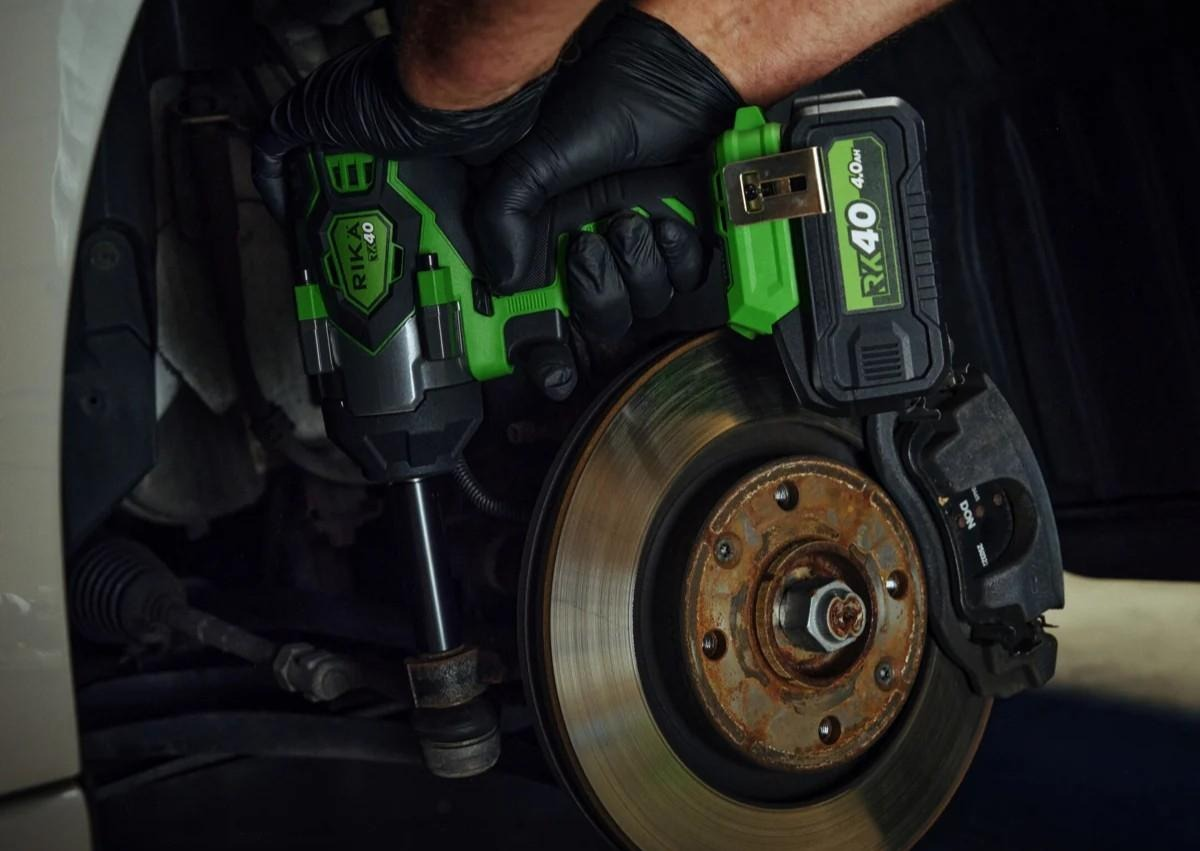
Cordless power tools have quietly changed the way we approach work around the home, the garage and the building site. Jobs that once meant hunting for an extension lead and stepping over trailing cables can now begin the moment you pick up a tool. The latest arrival on the UK market is a new 40V cordless range covering drilling, fixing, cutting, grinding and polishing, and it offers a good moment to look at what modern battery platforms can do for homeowners, keen DIY enthusiasts and tradespeople alike.
The Steady Rise of Cordless Tools
Not so long ago, cordless tools were seen as handy extras for small jobs, with corded versions reserved for anything that needed real power. Improvements in battery and motor design have changed that picture completely, and cordless tools now handle demanding tasks that once seemed impossible without a plug.
The biggest shift has been the move towards complete battery platforms. Rather than buying a drill with its own battery and charger, then a saw with a different set, many people now choose a single system where one battery type runs every tool in the range. It is a simple idea, but it makes a real difference to how tidy and efficient a workshop feels.
Why Battery Voltage Matters
In simple terms, a higher voltage platform can deliver more power to the motor, which helps with tougher, more sustained tasks such as drilling into masonry, long cuts through dense materials or heavier fastening work. For hanging pictures or assembling flat pack furniture, a lighter tool will do perfectly well. But for larger renovation projects, vehicle maintenance or daily site work, a 40V platform offers comfortable headroom, so the tool rarely feels as though it is straining.
Heat matters too. Power hungry tools such as grinders and impact wrenches place a heavy load on a battery, and as a pack warms up its output can fade before it is actually empty. Batteries designed to run cooler keep output steadier for longer, so the final cut of the afternoon feels much like the first, and they tend to age more gracefully over hundreds of charge cycles.
What the New 40V Range Brings to the Workbench
The newly arrived Rikä RK40 power tools show just how broad a single cordless platform can now be. The range runs to dozens of products, all sharing the same 40V battery:
- Drilling and fixing: combi drills for everyday work, an SDS Plus rotary hammer for brick, block and concrete, and brushless impact wrenches from general fastening up to heavier duty wheel nut work
- Cutting: a circular saw for clean, straight cuts, a jigsaw for curves and a reciprocating saw for rougher cutting and stripping out during a renovation
- Grinding and finishing: angle grinders with a braking feature that stops the disc quickly once the trigger is released, plus a rotary car polisher that makes the platform just as useful in the garage
The Value of One Battery Platform
With one battery type and one charger, there is far less clutter to manage and far less chance of arriving at a job with the wrong battery. A charged spare can move from the drill to the saw to the grinder in seconds, keeping work flowing.
It also makes it easy to build a collection gradually, starting with a drill and a couple of batteries and adding tools as new projects come along. Because a battery platform tends to shape every tool you buy afterwards, it is worth looking at the full spread of tools on the system before committing, and buying through an authorised supplier for genuine stock and proper warranty support.
Putting Cordless Tools to Work Around the Home
For homeowners, cordless freedom really shines during renovation work. Fitting shelving, repairing a fence or preparing a room for new floorboards all become simpler without a cable to wrestle with. Planning still comes first, though. Before laying a new floor, reading up on the common mistakes homeowners make when choosing new flooring is a sensible step. Once the material is chosen and the subfloor checked, a reliable drill, saw and driver make light work of fixing boards and fitting new skirting.
A few good habits keep every job safe and enjoyable:
- Match the tool to the task, saving heavier models for jobs that genuinely need them
- Wear suitable eye, ear and hand protection when cutting, grinding or drilling
- Let a hot battery cool before recharging it, and store batteries somewhere dry
- Check blades, bits and discs regularly and replace anything worn
A Platform That Grows With Your Projects
The arrival of another capable 40V cordless range is good news for anyone who enjoys improving their home, looking after their vehicle or earning a living with their hands. A single battery system that covers drilling, cutting, grinding and polishing removes much of the clutter and compromise that used to come with cordless tools. Think about the projects ahead, choose a platform that can grow alongside them and look after your batteries well, and you will have a set of tools ready for whatever the next job brings.
How to Share Security Camera Footage Safely
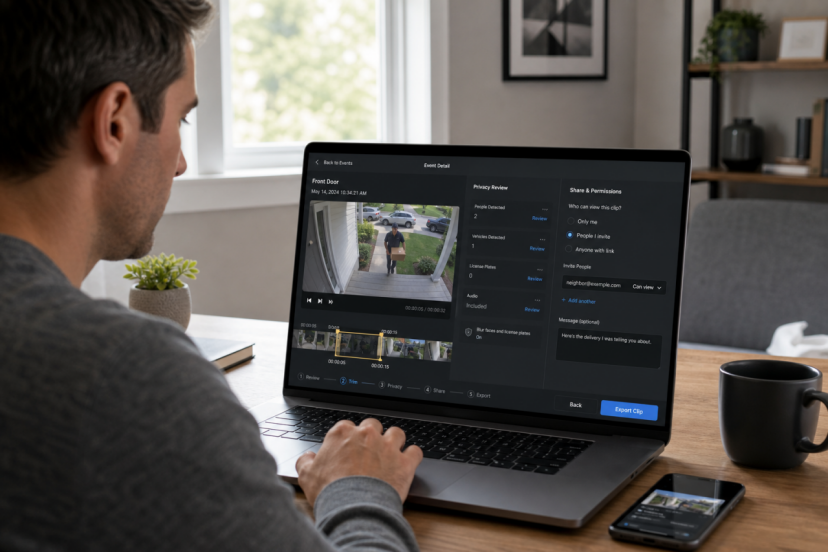
The clip you need to send is often buried inside a longer recording. A neighbor’s package disappears, a gate is left open, or a property manager asks what happened during a narrow window. Sending an entire camera feed can reveal faces, routines, license plates, or conversations that have nothing to do with that event.
The safer workflow is simple in principle: preserve the original file, make a separate copy, trim it to the relevant moment, and give each recipient only the access they need. The exact export and sharing controls vary by camera and app, so treat the steps below as a privacy checklist rather than a universal button path.
For readers comparing camera setups, eufy’s Security Cameras can help frame the storage and power choices behind a clip. A camera that keeps footage locally may require a different export routine from one that stores events in the cloud.
Decide Who Needs Which Part of the Clip
Before opening a share menu, write down the practical question the recipient is trying to answer. The right excerpt changes with the recipient, so use the role-based paths below instead of sending the same cut to everyone.
A family member usually needs enough footage to understand a delivery, visitor, or piece of damage. A short view of the approach and handoff may be enough; bedrooms, unrelated conversations, children, and a full-day timeline are not part of that request.
For a Property Manager or Landlord
A property manager or landlord may need the time-stamped section showing an entrance, shared hallway, or reported incident. Leave out other tenants’ routines and unrelated units, and never solve a request for one clip by handing over account credentials.
For Police or Another Authorized Agency
An authorized agency may ask for the original export, a narrowly trimmed viewing copy, or both. Keep the camera’s date and time visible, and provide the source through the requested channel without adding passwords, unrestricted live access, or footage from rooms outside the incident.
Requests for CCTV footage still need a clear purpose and a defined scope. Confirm who is asking, what they need to establish, and whether a shorter excerpt will answer the request before choosing a delivery method.
Audio deserves its own check. If the event can be understood visually, a video-only copy exposes less. Recording-consent rules differ across states and situations, so avoid turning a camera setting into a legal conclusion; check the requirements that apply to the location and people captured. [Source: Reporters Committee for Freedom of the Press, Reporter’s Recording Guide]
Do not trim the only copy. A short preservation routine keeps later edits from becoming the only record. Export or download the source clip in the camera system’s native format when possible, save it to a clearly named folder, and make a working copy for edits.
A clear, descriptive filename helps retain context without including sensitive private details. Try 2026-08-28_2214_driveway_camera03_original, then add _share-family or _share-manager to copies. Note the time zone separately when devices differ.
Check the file before sending it. Confirm that the timestamp is visible or noted separately, that the clip opens on another device, and that the export did not remove audio or metadata an authorized investigator may expect.
Store the original in a location with limited access, such as a read-only folder, offline drive, or household computer account. Cloud backups add convenience, but any synced copy should be reviewed and protected appropriately.
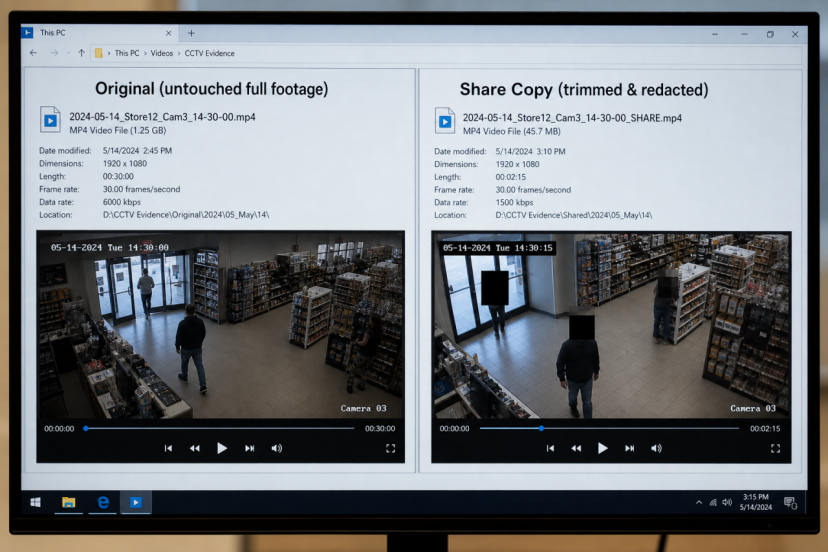
The working copy is where privacy edits belong. Keep the source untouched while the following three decisions narrow down what a recipient will see.
Open the working copy in a trusted editor and mark the smallest time window that answers the question. Include a few seconds before and after the event so movement is understandable, but avoid adding an hour of ordinary activity just because it is easier.
Look at the edges of the frame as well as the timeline. Crop or blur unrelated faces, house numbers, package labels, computer screens, and license plates when they are not relevant. A crop can remove context, so keep the unedited source and make a note of what was obscured in the share copy.
Use a new filename and, if practical, note the camera location, local date and time, and who prepared the copy. It is a reference, not a legal certification.
Compression is another judgment call. A messaging app may shrink a file until a face or plate is difficult to see. Use a method that preserves resolution, or a view-only link when supported, and open the recipient-facing copy before sending it widely.
Before sharing security camera footage, check the instructions for the exact camera. Export formats, clip limits, and download behavior vary by model, even when two cameras use the same app.
Control, Revoke, and Replace Access
Sharing a file and sharing an account are different actions. The access check should happen before the file or link is sent, not after a recipient has opened it. Choose the path that fits the recipient and the sensitivity of the clip.
Avoid sharing your camera account password or granting full account access just to share a single event clip. Create a separate copy or a recipient-specific link instead.
If you share security camera clips more than once, use the same naming and access checklist each time. A repeatable habit is useful here, provided the permissions still match the new recipient.
Before sending a link, inspect its scope. Ask whether it opens one clip or a live feed, whether downloads are allowed, which email addresses can open it, and whether the service records access. A short expiration can reduce the period of exposure, but it does not stop a recipient from saving or forwarding a file after download. No sharing control can promise that a clip will never be copied.
Keep a small sharing log for incidents that matter: recipient, file name, time sent, and permission setting. If a link is no longer needed, disable or replace it and remove downloaded copies from shared folders where you have control. Revocation is cleanup, not a rewind button.
When several people need different views, make separate copies. A property manager may need the entrance and timestamp; a family member may only need the package handoff. Individual files take a few extra minutes, yet they prevent a broad audience from seeing details that belonged to a narrower request.
Account hygiene still matters around a one-time share. Use a unique password, turn on multifactor authentication when available, install camera and app updates, and review shared users after the incident. The Federal Trade Commission recommends these measures for internet-connected home security cameras. [Source: Federal Trade Commission, How To Secure Your Home Security Cameras]
Match the Camera to the Sharing Scenario
Picture a late-night delivery in the driveway. The useful moment lasts less than a minute, but the wide view also shows a neighbor’s gate and several hours of ordinary activity. The camera setup affects how easily that moment can be found and preserved, while the sharing decision determines how much of the surrounding scene leaves the household.
Start With the Sharing Scenario
Decide what the recipient must see before deciding which camera view or recording source to open. A family member may need the approach and handoff, a property manager may need the entrance and timestamp, and an authorized agency may need the untouched source alongside a narrow viewing copy. A solar, wire-free camera can suit an exterior location where running power is difficult; local storage may keep an export routine close to home, but neither choice removes the need to trim the scene.
A Practical Camera Setup Example
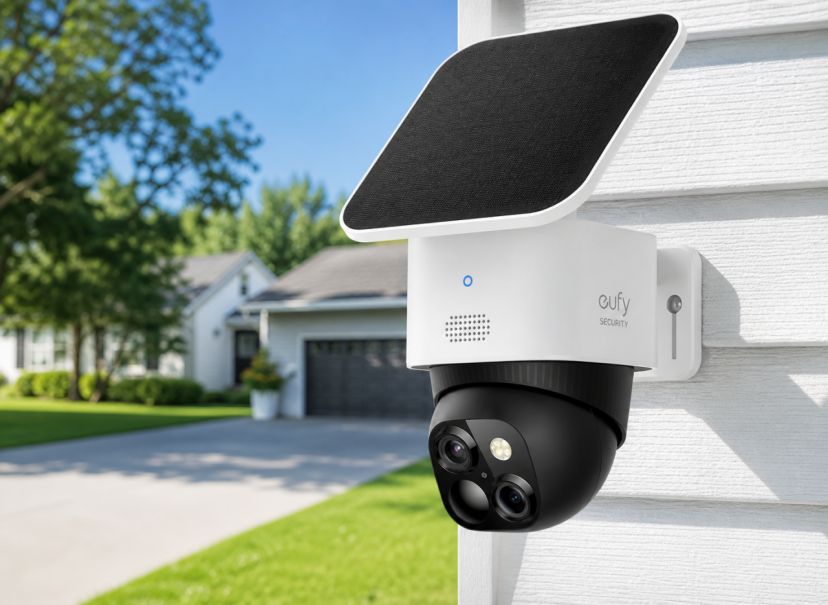
The eufy SoloCam S340 is one suitable choice to consider. Its listed capabilities include a dual-camera design, up to 3K clarity, 360° coverage, solar-assisted power, and local storage. Do not assume one-tap clip sharing, link expiration, or revocation of downloaded files; check the instructions for the exact setup and package.
Those details matter in a real handoff. A driveway view may show a useful approach and an unrelated neighbor’s yard in the same frame; a dual view can change how the event is reviewed, but it does not remove the need to trim the copy. Local storage can make the original easy to retain, while export permissions and the recipient’s device still determine what can actually be opened.
The useful question is whether the setup lets the household locate one event, keep an untouched source, and create a narrow copy without granting permanent access to everything around it.
Sharing a security camera clip safely starts with a narrow question: who needs to see what? Preserve the original recording, then create a separate copy that includes only the relevant time, view, and audio. Remove unrelated faces, addresses, license plates, or conversations where appropriate, and confirm that the exported file still opens clearly.
Send the copy without exposing the camera account or live feed, and limit link access where those controls exist. If another recipient needs more context, prepare a new copy instead of widening existing access. Share the event, not the household’s routine.

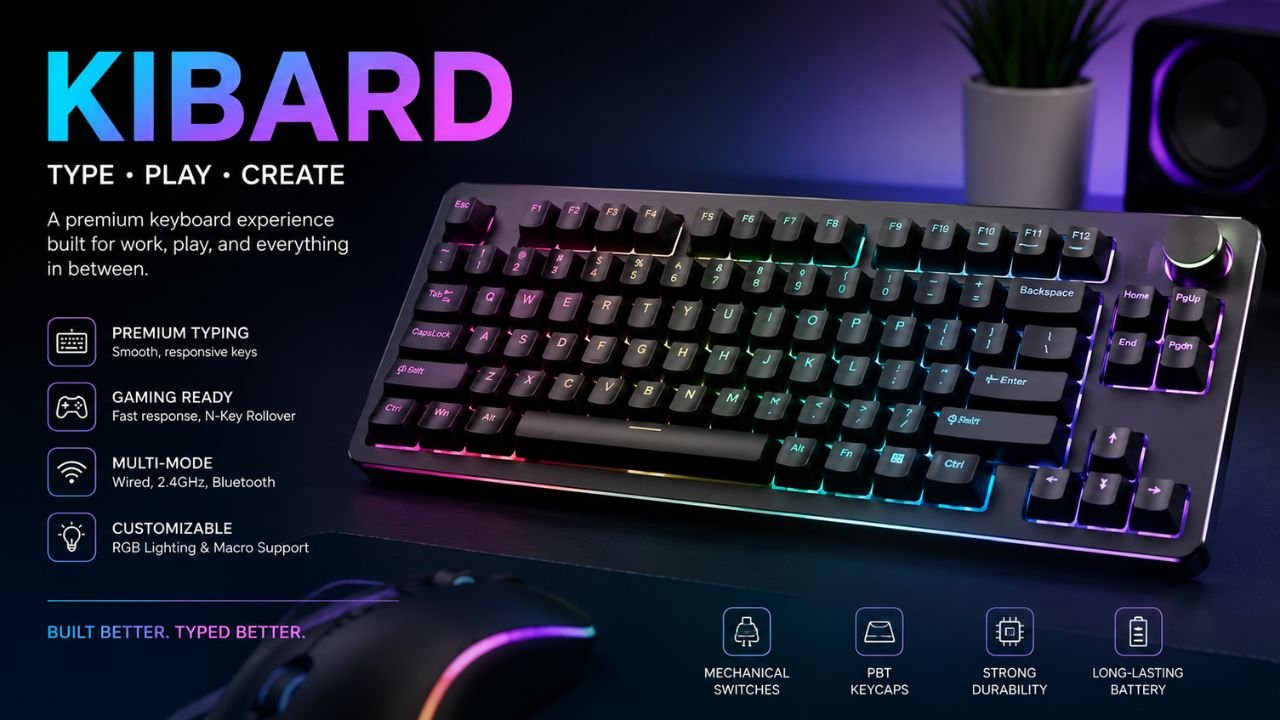
The term Kibard is one of the most common misspellings of the word keyboard. Many people type “Kibard” into search engines when looking for computer keyboards, gaming keyboards, wireless keyboards, or typing accessories. Despite being a typo, the term has become widely recognized across online marketplaces and search platforms.
A kibard is an input device that allows users to enter letters, numbers, symbols, and commands into computers, laptops, tablets, and smartphones. Whether you are gaming, coding, writing documents, or browsing the web, a keyboard remains one of the most important tools for interacting with digital devices.
What Is a Kibard?
A kibard refers to a keyboard, the primary input device used for communication with computers and other electronic devices. It converts physical key presses into digital signals that software can understand and process.
Most modern keyboards contain alphabet keys, number keys, function keys, navigation controls, and command keys that allow users to perform countless tasks efficiently. From writing emails to controlling professional software, the keyboard remains an essential part of everyday computing.
The popularity of keyboards continues to grow as remote work, gaming, software development, and digital content creation become increasingly important worldwide.
The Fascinating History of the Keyboard
The modern keyboard has roots that stretch back more than 150 years. Its evolution began with mechanical typewriters before transitioning into electronic communication systems.
In 1873, inventor Christopher Latham Sholes patented the famous QWERTY layout. Contrary to popular belief, the arrangement was intentionally designed to reduce mechanical jams in early typewriters by separating commonly used letter combinations.
The widespread adoption of QWERTY accelerated when Remington mass-produced commercial typewriters. Over time, the layout became the global standard and remains dominant today.
Interestingly, the word “TYPEWRITER” can be typed entirely using the top row of a standard QWERTY keyboard, a fact often used by early sales representatives to demonstrate typing speed.
Essential Components of a Standard Kibard
Every modern keyboard contains several key sections designed for different functions.
Alphabet keys allow users to type letters from A to Z. Number keys provide access to digits and special symbols. Function keys, typically labeled F1 through F12, perform shortcuts within software applications.
Control keys such as Ctrl, Alt, and Shift help execute commands and keyboard shortcuts. Navigation keys, including arrow keys, Home, End, and Page Up, simplify movement through documents and web pages.
The Enter key confirms commands, while the Spacebar creates spacing between words. Together, these components create a complete input system that supports efficient computing.
Mechanical Keyboards and Why They Are So Popular
Mechanical keyboards are considered the gold standard among enthusiasts, gamers, programmers, and professional writers.
Unlike traditional keyboards, mechanical models use individual switches beneath every key. These switches provide tactile feedback, improved responsiveness, and significantly longer lifespans.
Many mechanical keyboards can withstand tens of millions of keystrokes without performance degradation. Users also enjoy customizing switches, keycaps, RGB lighting, and typing sounds to create a personalized experience.
Popular mechanical keyboard manufacturers include Keychron, SteelSeries, Corsair, Logitech, and Wooting. Their products continue to dominate both gaming and productivity markets.
Membrane Keyboards for Everyday Use
While mechanical keyboards receive much attention, membrane keyboards remain the most common option worldwide.
These keyboards use a rubber dome membrane beneath the keys. When pressed, the membrane completes an electrical circuit that registers the keystroke.
Membrane keyboards offer several advantages. They are quiet, lightweight, affordable, and widely available. Their low cost makes them ideal for schools, offices, libraries, and home users who need dependable performance without premium pricing.
Although they may not provide the tactile satisfaction of mechanical switches, membrane keyboards remain practical for everyday tasks.
Ergonomic Keyboards and Health Benefits
Ergonomic keyboards are specifically designed to reduce strain during long typing sessions.
Many feature split layouts, curved designs, or integrated wrist rests that encourage natural hand positioning. These improvements help reduce fatigue and may lower the risk of repetitive stress injuries.
Professionals who spend eight or more hours typing each day often benefit from ergonomic designs. Writers, programmers, accountants, and customer support representatives frequently choose these keyboards for improved comfort.
Modern ergonomic keyboards combine health-focused engineering with advanced wireless technology, making them attractive options for productivity-focused users.
Different Keyboard Sizes and Form Factors
Not all keyboards are created equal. Manufacturers offer numerous form factors to suit different needs and workspace requirements.
Full-size keyboards include every standard key, including a dedicated number pad. They are preferred by accountants, data entry professionals, and office workers.
TenKeyLess, often called TKL, removes the number pad to save desk space. Many gamers prefer this layout because it allows more room for mouse movement.
Compact 75 percent keyboards retain essential keys while minimizing unused space. Meanwhile, ultra-compact 60 percent layouts remove navigation clusters and function rows entirely, creating highly portable setups.
Advanced Technologies in Modern Kibard Designs
Keyboard technology has advanced significantly in recent years. One of the biggest innovations involves magnetic Hall Effect switches.
Instead of relying on traditional physical contact points, Hall Effect keyboards use magnetic sensors to detect key movement. This technology allows adjustable actuation distances, rapid trigger functionality, and analog-style input control.
Another major advancement is N-Key Rollover, often abbreviated as NKRO. This feature ensures every key press registers accurately, even when multiple keys are pressed simultaneously.
Hot-swappable sockets have also become increasingly popular, allowing users to replace switches without soldering equipment.
Best Kibard Models Available Today
Several keyboard models consistently rank among the best options available in the United States market.
The SteelSeries Apex Pro TKL is widely recognized as a top competitive gaming keyboard thanks to its adjustable OmniPoint switches and advanced customization features.
The Logitech MX Keys S dominates productivity environments with its low-profile keys, intelligent backlighting, and exceptional typing comfort.
For enthusiasts, the Keychron Q1 Max delivers premium construction, gasket mounting, wireless connectivity, and extensive customization capabilities.
Each of these models serves a different audience while maintaining exceptional quality and performance.
Kibard Pricing Guide
Keyboard prices vary dramatically depending on materials, features, and technology.
Budget keyboards typically range from $15 to $40. These products often feature membrane switches and basic functionality suitable for everyday tasks.
Mid-range keyboards generally cost between $50 and $120. Buyers gain access to wireless connectivity, mechanical switches, RGB lighting, and improved build quality.
Premium keyboards often start around $130 and can exceed $250. These products frequently include CNC-machined aluminum bodies, Hall Effect technology, premium wireless systems, and enthusiast-level customization options.
Understanding your needs helps determine the ideal price category for your purchase.
Alternatives to Traditional Keyboards
Technology continues to create new methods of computer interaction beyond traditional keyboards.
Voice-to-text software allows users to dictate content directly into applications using artificial intelligence. Modern operating systems offer highly accurate speech recognition capabilities.
Virtual keyboards provide touchscreen-based input on tablets, smartphones, and accessibility devices. Graphic tablets enable handwritten input that converts into digital text automatically.
Eye-tracking systems represent another breakthrough, allowing users with mobility limitations to control computers through eye movement alone.
While traditional keyboards remain dominant, these alternatives continue expanding accessibility and convenience.
Current Trends Shaping the Future of Kibard Technology
The keyboard industry is evolving rapidly as manufacturers compete to deliver better performance, comfort, and customization.
Hot-swappable mechanical keyboards are becoming standard rather than premium features. Users increasingly expect the ability to replace switches without technical expertise.
Premium keycap materials such as PBT plastic continue gaining popularity due to their durability and resistance to wear. Compact layouts like TKL and 75 percent designs are replacing bulky full-size models in many workspaces.
Wireless performance has improved dramatically, making cordless keyboards nearly indistinguishable from wired alternatives. Combined with magnetic switches, customizable software, and advanced ergonomics, these innovations are shaping the next generation of keyboard technology.
Conclusion
Although Kibard is simply a common misspelling of keyboard, it often leads users to discover one of the most important devices in modern computing. From mechanical gaming keyboards and ergonomic office models to wireless productivity tools and advanced Hall Effect technology, today’s keyboard market offers options for every user and budget.
Whether you are a gamer seeking lightning-fast response times, a professional looking for all-day comfort, or a student needing a reliable typing companion, choosing the right keyboard can dramatically improve your overall computing experience. As technology continues to evolve, keyboards will remain a crucial bridge between humans and digital systems for years to come.
READ ALSO: Discover ENGWE Folding E-Bikes for Easy City Travel

Commercial Cost Seg Study vs. Traditional Depreciation: A Side-by-Side ROI Breakdown for 2025

Dual Motor Fat Tyre E-Bikes: Why Rural Britain Is Swapping the Quad for Two Wheels

How to Get a Live TV App Running on Every Screen in Your Home in One Evening

Who Is Shameera? All You Need To Know About Charli XCX’s Mother

Who Is Gulliver Flynn Oldman? The Untold Story of Sir Gary Oldman’s Son

AI Video for Social Media: How Small Brands Keep Up Without Burning Out
-
Biographies9 months ago
Who Is Shameera? All You Need To Know About Charli XCX’s Mother
-
Biographies9 months ago
Who Is Gulliver Flynn Oldman? The Untold Story of Sir Gary Oldman’s Son
-
 Blog5 months ago
AI Video for Social Media: How Small Brands Keep Up Without Burning Out
-
 Biographies10 months ago
Meet Rosemary Turner: The Mother of Actor Callum Turner
-

 Biographies8 months ago
Who is Alexandra James? Inside The Life of Jeremy Clarkson’s Former Partner
-
 Biographies10 months ago
Who is Todd McRae? Meet Tate McRae’s Father
-
 Biographies9 months ago
Who Is Daniel Mara? The Untold Story of Kate Mara’s Private Sibling
-
 Celebrity10 months ago
Who Is Peter Hernandez? The Real Story of Bruno Mars’ Father